

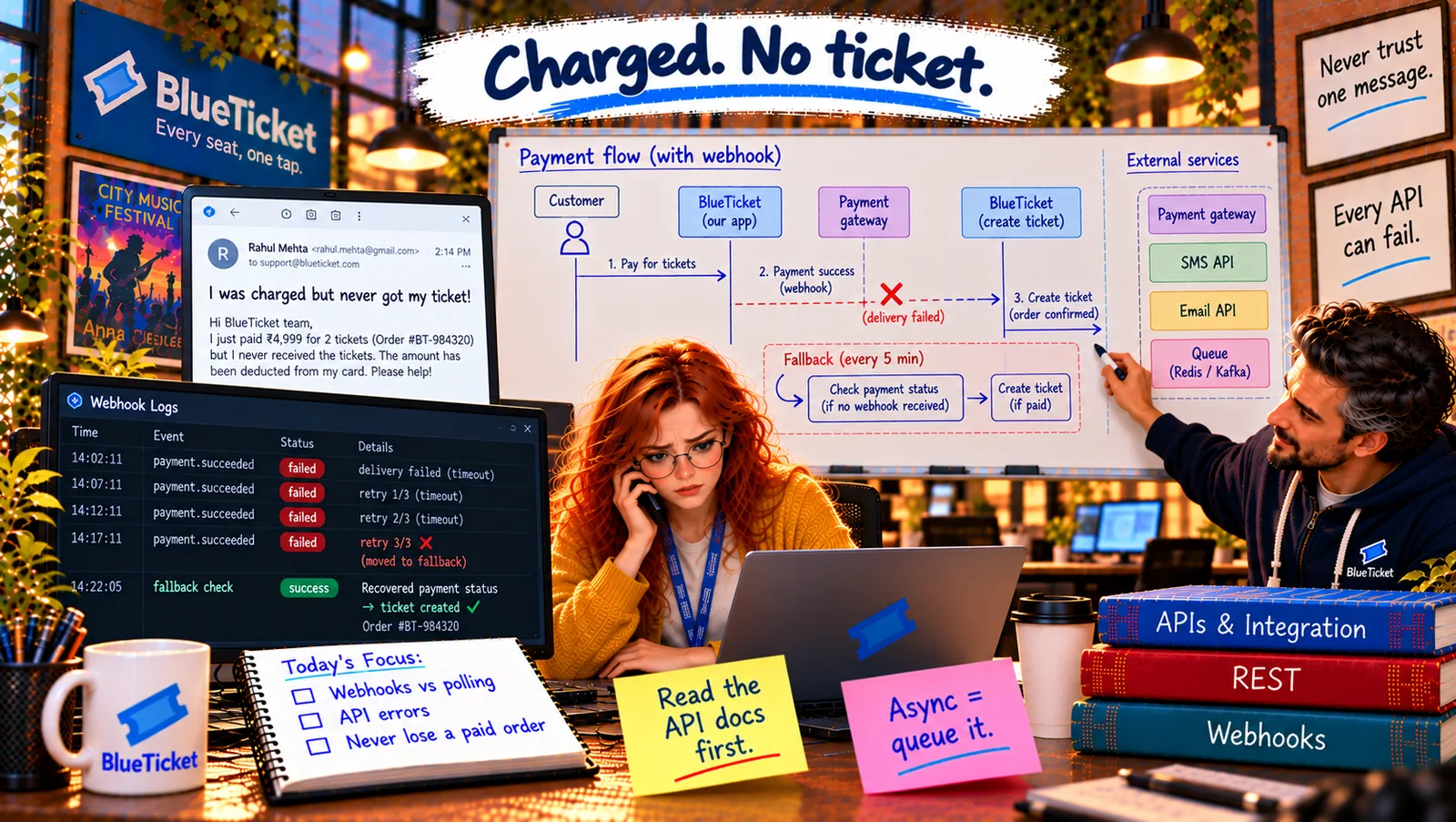
In this chapter
We'll learn how to work well with third-party APIs like payments, SMS and email — what to read in their documentation before writing code, sandboxes, limits and status pages — and how teams describe their own APIs with OpenAPI/Swagger, explained as reading the manual before assembling furniture.
The Problem in Real Life
In the incident review, John reads out one line from the payment provider's documentation — the one about replying within 10 seconds. It had been there for three years. "Nobody read it," he says. "Not because anyone was lazy. Because we never made reading the docs part of the job."
Meanwhile, Riverside Arena's developer sends a friendly email: "Love the new pagination! Is there a document listing all your API's endpoints and fields? Right now we're guessing from examples."
Read the API docs first. Then read the part about errors again.
John
Trying Things Until They Work vs. Reading the Manual First
Rules hidden in the docs
Time limits, retries, rate limits and test modes are all written down — if you look.
Their outage is your outage
When the SMS provider is down, BlueTicket's reminders are down too.
Your API needs a manual too
Partners shouldn't have to guess your fields from examples.
Third-Party APIs, API Documentation and OpenAPI
The flat-pack furniture analogy: you can try to build a wardrobe without the manual. It mostly works — until you discover step 4 needed to happen before step 2, and you have to take it apart. Reading the manual first takes ten minutes and saves an afternoon. Third-party APIs are flat-pack furniture: the manual is the documentation.
- Third-party APIs — specialists you rent: payments (take cards safely and legally), SMS and email (deliver messages reliably), maps, identity ("Sign in with Google", Act 22), AI, and more. You get years of a specialist's work through one API key — and you also depend on them.
- What to read before writing code: authentication (which keys, test vs live — Act 22); the main flow step by step; errors — every code and what to do about it; rate limits (how many requests per second, what happens beyond); timeouts and retries (theirs and yours); webhooks — which events, signatures, delivery rules (Friday's lesson); idempotency; versioning and how they announce changes; and sandbox/test mode details.
- Sandbox — practising on test furniture: most providers have a sandbox or test mode: fake cards, fake phone numbers, no real money or messages. Special test values trigger specific situations — a card number that always gets declined, one that triggers a bank check — so you can test failure paths, not just success.
- SDKs — the provider's own toolkit: many providers publish an SDK (a library, Act 04) that wraps their API: signature checking, retries and types already done. Using it saves mistakes — but you still need to understand the rules underneath.
- Planning for their bad days: set timeouts on every call (chapter three); decide what your app does when they're down — queue the SMS and send it later, show "your ticket will arrive by email shortly"; subscribe to their status page (a website where providers report outages); and keep a way to switch providers for critical services if one fails badly.
- API documentation — your own manual: when you are the provider, others need your manual: every endpoint, every field and type, authentication, errors, pagination, examples, and a changelog. Out-of-date docs are worse than none (Act 16).
- OpenAPI / Swagger — a manual machines can read: OpenAPI (formerly called Swagger) is a standard format — usually a YAML or JSON file — that describes an API precisely: endpoints, parameters, request and response shapes, error codes. From one OpenAPI file, tools can generate interactive documentation (try requests in the browser), client libraries in many languages, and tests that check the real API matches the description.
| Question | Payment provider's answer |
|---|---|
| How do we authenticate? | Restricted secret keys; test and live separate |
| Which errors, and what do we do? | Card declined → show message; 5xx/timeout → retry with idempotency key |
| Rate limits? | 100 requests/second; 429 with Retry-After |
| Webhook rules? | Signed (HMAC); reply 2xx within 10 s; 3 retries over 1 hour |
| Idempotency? | Idempotency-Key header, kept 24 hours |
| Sandbox? | Test cards for success, decline, bank check |
| Outages? | Status page; we reconcile every 5 minutes |
| Kind | What it does | If it's down |
|---|---|---|
| Payments | Charges cards, refunds | Checkout paused with a clear message; reconcile later |
| SMS | Reminders, login codes | Messages wait in the queue; codes fall back to email |
| Confirmations, tickets | Emails wait in the queue; tickets visible in the app | |
| Identity (Google) | Sign in for venues | Venues use email + password + MFA instead |
openapi: 3.1.0info:title: BlueTicket Venue APIversion: 1.4.0paths:/v1/orders:get:summary: List orders for your venuesecurity: [{ oauth2: [sales:read] }]parameters:- { name: status, in: query, schema: { type: string, enum: [paid, refunded] } }- { name: after, in: query, description: Cursor from the previous page, schema: { type: string } }- { name: limit, in: query, schema: { type: integer, maximum: 100, default: 100 } }responses:"200": { description: A page of orders }"401": { description: Missing or invalid token }"429": { description: Too many requests }
BlueTicket's new habits: every new integration starts with an integration checklist filled in from the provider's docs — auth, errors, rate limits, timeouts, webhooks, idempotency, sandbox, status page — reviewed in the pull request (Act 18). The payment integration's checklist is filled in properly for the first time, and two more risky settings are fixed.
BlueTicket's own manual: Anna writes an OpenAPI file for the venue API, and the pipeline (Act 19) now checks that the real responses match it. Riverside's developer gets a link to interactive docs at developers.blueticket.example and replies: "This is the best API documentation we've received from any partner."
The close: a month later, the payment provider has a 40-minute webhook outage during a Saturday on-sale. 87 payments succeed without a webhook. Every five minutes, the reconciliation job quietly creates the missing orders. The alert tells the team what's happening; not a single fan emails support. Anna forwards the graph to Samantha with one line: "No paid order lost."
Key Takeaway
Third-party APIs give you a specialist's work through one key — and make you depend on them. Read the docs first: authentication, the flow, every error, rate limits, timeouts, webhooks, idempotency, versioning and the sandbox. Use their SDKs and sandboxes, set timeouts and plan for their outages. When you're the provider, publish a real manual — ideally an OpenAPI (Swagger) file that generates interactive docs, clients and tests.
Why This Matters
Integrating with third-party APIs is one of the most common tasks for a developer, and most integration bugs come from rules that were in the documentation all along. And when you build APIs for others, clear docs — often OpenAPI — are what make them pleasant and safe to use.
No paid order lost — even during the provider's outage. John gives Anna one last exercise: design BlueTicket's complete payment flow on paper, including every way it can go wrong.