

In this chapter
We'll learn why HTTP forgets you after every request, and how the web remembers you anyway — cookies (a festival wristband), sessions (the guest list behind the gate), authentication vs. authorization, and stateless vs. stateful — then fix the checkout logout bug.
The Problem in Real Life
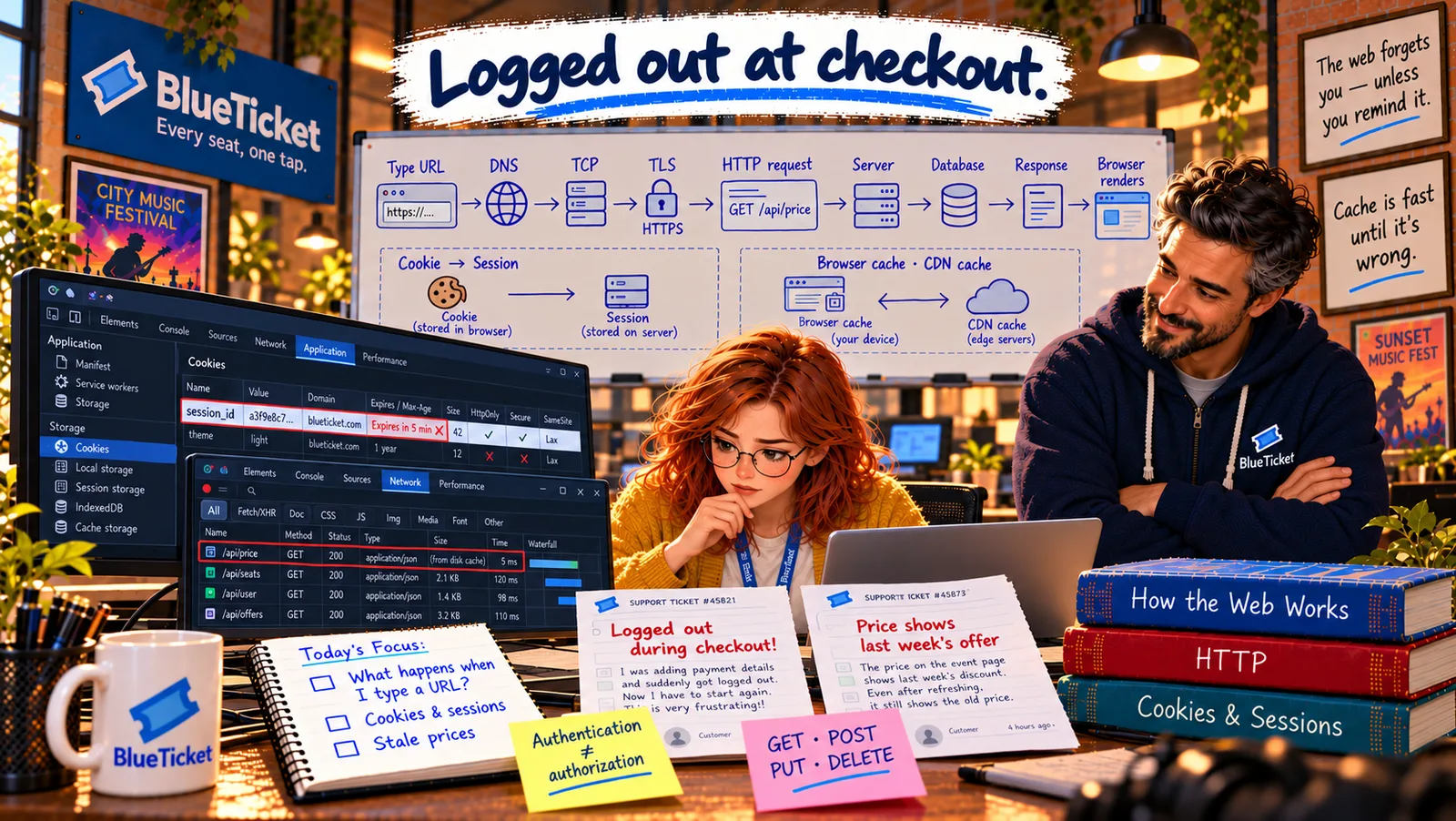
The second complaint. Anna finally reproduces it: she logs in, picks seats, fills in her card details slowly — and when she clicks Pay, she's sent back to the login page. Her seats are gone.
She checks the time: she logged in at 10:00:00 and clicked Pay at 10:05:12. She tries again, faster, and it works. "It's like BlueTicket forgets who I am after five minutes," she says. John nods. "It does. And the surprising part is that remembering you at all takes effort — because the web is built to forget."
HTTP has no memory. Every request arrives as a stranger. Everything that feels like "being logged in" is a trick we add on top.
John
"The Site Knows Me" vs. Proving Who You Are on Every Request
HTTP forgets
Each request stands alone. The server doesn't automatically know it came from the same person as the last one.
Who are you, and what may you do?
Proving identity and checking permissions are two different questions.
Memory has an expiry
The way the site remembers you can expire — sometimes far too soon.
Cookies, Sessions, Authentication and Authorization
Stateless — a shop assistant with no memory: imagine a shop where the assistant forgets every customer the moment they turn away. You ask for a shirt; they hand it over. You come back a minute later to pay — they've no idea who you are. HTTP is like that: each request is stateless, meaning the server keeps no memory of earlier requests by itself. This is actually a good design — it keeps servers simple and lets any server answer any request — but it means "being logged in" has to be built on top.
The festival wristband analogy: at a music festival, you show your ticket and ID once at the gate. They check the guest list and put a wristband on your arm. After that, every stage and every bar just looks at your wristband — nobody checks your ID again. The web does exactly the same thing.
- Authentication — showing your ID at the gate: authentication means proving who you are — usually with an email and password, sometimes with a code from your phone. It's done once, when you log in.
- Cookie — the wristband: after you log in, the server sends back a small piece of data in a response header (
Set-Cookie). The browser stores it and automatically attaches it to every later request to the same site (in theCookieheader). A cookie is just a small named value the browser keeps for a website — like a wristband you carry and show everywhere without thinking. - Session — the guest list behind the gate: the wristband itself usually holds only a random ID, like
session_id=8f2c.... On the server, that ID points to a session: a record saying "this is Zoë Adams, logged in at 10:00, with seats C14 and C15 held." When a request arrives with the cookie, the server looks up the session and knows who it's talking to. The cookie is the wristband; the session is the entry on the guest list that the wristband points to. - Authorization — VIP or general entry: authorization means checking what you're allowed to do, now that we know who you are. A general wristband gets you into the main area; a VIP wristband also gets you backstage. On BlueTicket, any logged-in fan can buy tickets; only organisers can edit events; only admins can issue refunds. Remember it simply: authentication is "who are you?", authorization is "are you allowed?"
| At the festival | On the web |
|---|---|
| Showing ID and ticket at the gate | Authentication — logging in |
| The guest list at the gate | Sessions stored on the server |
| The wristband on your arm | A cookie with a session ID |
| Showing the wristband at every stage | The browser sending the cookie with every request |
| VIP vs. general wristband | Authorization — what you're allowed to do |
| The wristband expiring at midnight | Cookie Max-Age / session expiry |
| Feature | Authentication | Authorization |
|---|---|---|
| Question | Who are you? | Are you allowed to do this? |
| Happens | Once, at login | On every protected action |
| Example | Email + password, phone code | Only organisers can edit events |
| Failure status code | 401 Unauthorized | 403 Forbidden |
| Version | Set-Cookie | Result |
|---|---|---|
| Before | session_id=...; Max-Age=300 | Logged out after 5 minutes, even mid-checkout |
| After | session_id=...; Max-Age=7200 (renewed on each request) | Active fans stay logged in; idle sessions end after 2 hours |
Logging in and staying logged in
POST /login with email + password
authentication — the ID at the gate
Server creates a session
guest list: session 8f2c → Zoë Adams
Set-Cookie: session_id=8f2c
the wristband, stored by the browser
Every later request carries the cookie
server looks up the session — knows it's Zoë
Authorization check
is Zoë allowed to do this?
Stateless requests, stateful application: each HTTP request is still stateless — it carries everything needed (including the cookie) on its own. But the application as a whole is stateful: it remembers things between requests, using sessions, the database and cookies. The memory lives on the server and in the browser — not in HTTP itself.
Cookies have rules too: when the server sets a cookie, it decides how long it lives (Max-Age or Expires) and how it's protected. HttpOnly stops JavaScript on the page from reading it (so stolen scripts can't grab it), Secure sends it only over HTTPS, and SameSite limits when other sites can trigger requests that carry it. You'll see why these matter in Act 22.
Finding the bug: Anna looks at the login response in the Network tab: Set-Cookie: session_id=8f2c...; Max-Age=300; HttpOnly; Secure. Max-Age=300 — five minutes. Someone shortened it months ago while testing session expiry, and the change shipped by accident. After five minutes, the browser throws the wristband away, the next request arrives with no cookie, and the server treats the fan as a stranger — back to the login page.
The fix: the session should last as long as a real visit — BlueTicket chooses two hours, and sliding: every request resets the timer, so an active fan is never logged out mid-checkout, while an idle laptop logs itself out eventually. Anna also adds a test that fails if the session is ever shorter than an hour again. Both of the morning's complaints are now fixed: one was a copy that lived too long, the other a memory that died too soon.
Key Takeaway
HTTP is stateless — every request arrives as a stranger. Authentication proves who you are once (the ID at the gate); the server then gives the browser a cookie (a wristband) that it sends with every request; the cookie points to a session on the server (the guest list entry). Authorization decides what you may do. Cookie lifetime and protections are set by the server — and a cookie that expires too soon logs people out.
Why This Matters
Every app with accounts uses these ideas, and they're also where many security problems live: stolen cookies, missing authorization checks, sessions that never expire. Getting the basics right — who are you, what may you do, how long do we remember you — is the foundation for Act 22's security work and for a checkout that 50,000 fans can actually finish on Sale Day.
Both bugs are fixed. While tracing the checkout, Anna noticed that most of the requests her browser makes aren't for pages at all. They're small messages to addresses starting with /api/, full of curly brackets. Those are APIs — the way programs talk to each other.