

In this chapter
We'll learn the main building blocks every cloud offers — compute, networking, load balancers, storage (including object storage), databases — and what managed services do for you, explained as the parts of a well-run office building.
The Problem in Real Life
Anna opens the cloud provider's list of services. There are more than two hundred of them, with names that tell her nothing. She closes the tab.
John opens it again and scrolls straight past almost everything. "Ignore 95% of this. Every provider sells the same six or seven basic things with different names. Learn those, and you can read any cloud architecture in the world."
Two hundred services. Six ideas.
John
Two Hundred Confusing Names vs. A Few Building Blocks
Too many services
Each provider has hundreds of products with different names for the same ideas.
Everything must connect safely
Servers, databases and storage need a private network, with only the right doors open to the internet.
Different data, different storage
Database rows, server disks and millions of ticket PDFs each need a different kind of storage.
Compute, Networking, Storage, Databases and Managed Services
The office building analogy: a well-run office building has workers doing the jobs, corridors and locked doors connecting rooms, a reception desk at the entrance, desk drawers for each worker, a huge archive room for boxes of documents, filing cabinets with organised records, and a facilities company that fixes the lifts and lights so the tenants don't have to. A cloud system has exactly these parts.
- Compute — the workers: compute services run your code. Three main kinds: virtual machines (IaaS — EC2, Compute Engine), container services (run your container images — AWS ECS, Google Cloud Run, Azure Container Apps; Kubernetes later) and serverless functions (run a small piece of code only when something happens, like a file upload, and pay per run — AWS Lambda, Cloud Functions).
- Cloud networking — corridors and locked doors: you get a private network of your own inside the cloud (called a VPC, virtual private cloud). It's split into public subnets (rooms facing the street — for the load balancer) and private subnets (inner rooms — for app servers and databases, unreachable from the internet). Security groups / firewall rules (Act 11) are the locks: "the database accepts connections only from the app containers, on port 5432."
- Load balancers — the reception desk: a managed load balancer (Act 14) sits in the public subnet, holds the HTTPS certificate (Act 19), checks the health of every app copy and spreads visitors across them in every zone. One front door, many workers behind it.
- Block storage — each worker's desk drawer: a block storage volume is a virtual disk attached to one VM — fast, like a laptop's SSD. When the VM goes away, the disk is usually deleted too unless you keep it.
- Object storage — the giant archive room: object storage (AWS S3, Google Cloud Storage, Azure Blob Storage) stores files of any size as objects, each found by a name (key), like a coat-check ticket. It's practically unlimited, very cheap, extremely durable (copied across zones automatically) and reachable by URL. Perfect for images, ticket PDFs, backups and logs — not for data you query like a database.
- Cloud databases — the filing cabinets: managed databases (AWS RDS, Cloud SQL, Azure Database) run PostgreSQL, MySQL and others for you; plus managed Redis and many NoSQL databases (Act 13). You get a connection string (Act 13); the provider handles servers, updates, backups, standby and failover.
- Managed services — the facilities company: a managed service is any service where the provider runs and maintains the hard parts — databases, load balancers, queues, Redis, object storage. You pay a bit more than raw VMs, but you skip a whole job: patching, backups, failover, 3 AM repairs. For small teams, this is usually the best deal in the cloud.
| Block | Office version | AWS | Google Cloud | Azure |
|---|---|---|---|---|
| Virtual machines | Workers with their own office | EC2 | Compute Engine | Virtual Machines |
| Containers | Workers in shared offices | ECS / EKS | Cloud Run / GKE | Container Apps / AKS |
| Serverless functions | Workers called in per job | Lambda | Cloud Functions | Functions |
| Private network | Corridors and locked doors | VPC | VPC | Virtual Network |
| Load balancer | Reception desk | Elastic Load Balancing | Cloud Load Balancing | Load Balancer |
| Object storage | Archive room | S3 | Cloud Storage | Blob Storage |
| Managed SQL database | Filing cabinets | RDS | Cloud SQL | Azure Database |
| Feature | Block storage | Object storage |
|---|---|---|
| Office version | A worker's desk drawer | The archive room |
| Attached to | One VM | Nothing — reached by URL/API |
| Size | Fixed, chosen in advance | Practically unlimited |
| Good for | OS, database files on a VM | Images, PDFs, backups, logs |
| Durability | Within one zone | Copied across zones automatically |
BlueTicket's cloud building blocks
Fans
browsers and phones
CDN + object storage
images, ticket PDFs
Load balancer
public subnet · HTTPS
App containers (zones A + B)
private subnets · container service
Managed PostgreSQL + standby
private · only app can connect
Managed Redis
sessions, cache
Serverless function
makes ticket PDFs
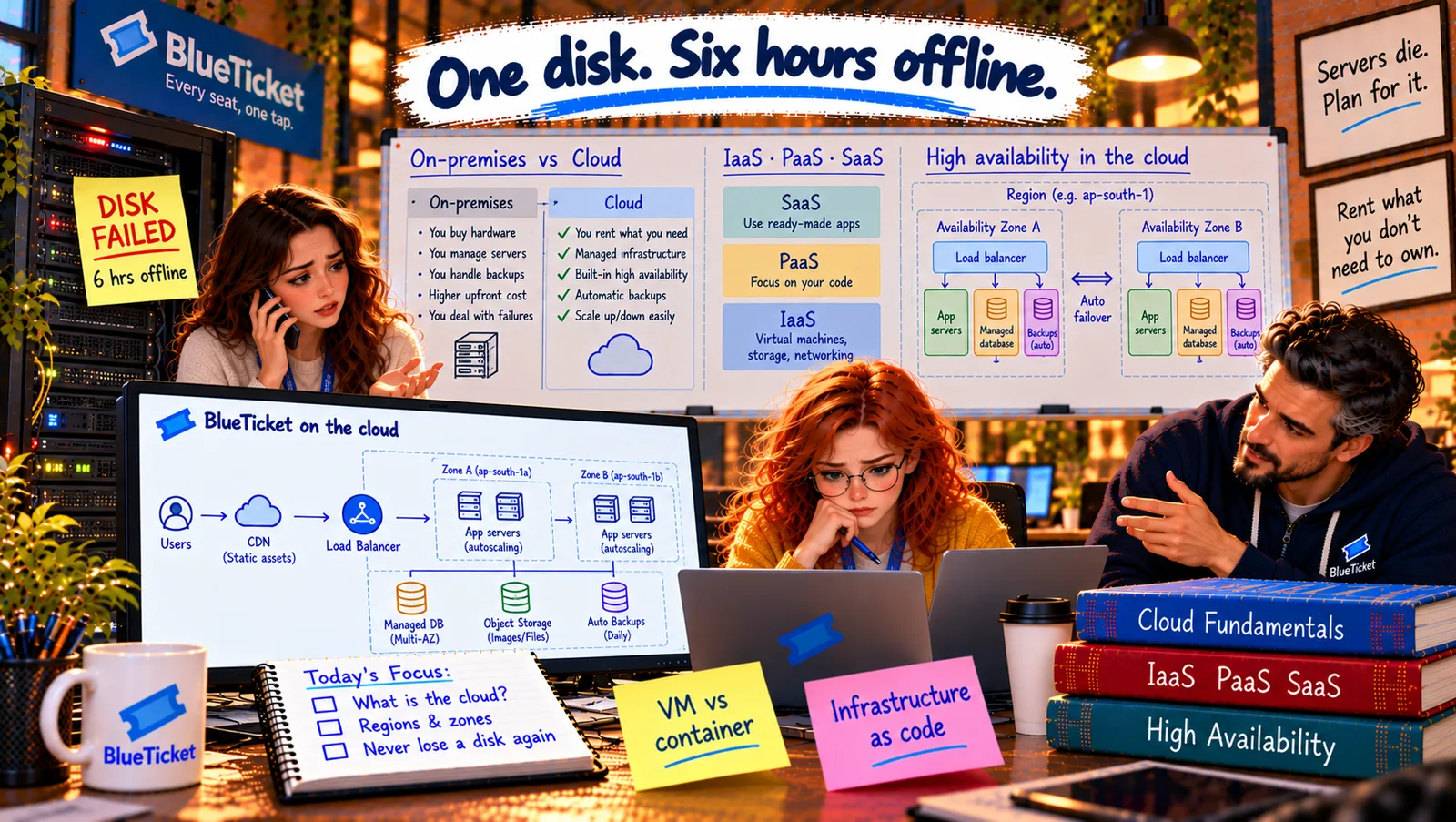
BlueTicket in the cloud, piece by piece: fans → load balancer (public subnet, HTTPS) → app containers on a container service (private subnets, zones A and B) → managed PostgreSQL with a standby (private, only the app can connect) and managed Redis. Event images and ticket PDFs move from the old servers' disks into object storage, served through the CDN (Act 12). A small serverless function turns each confirmed order into a ticket PDF. Database backups land in object storage in another region.
The migration night: the move happens on a quiet Tuesday night: copy the database to the managed service, keep it in sync, point DNS (Act 19) at the new load balancer, check, done. Twenty minutes of "maintenance" banner. Not one lost order.
Key Takeaway
Every cloud offers the same few building blocks, like an office building: compute (VMs, containers, serverless functions — the workers), networking (a private VPC with public and private subnets and security groups — corridors and locks), load balancers (reception), block storage (a VM's disk — the desk drawer), object storage like S3 (the archive room for files), managed databases (filing cabinets) and managed services in general (the facilities company that does the hard upkeep).
Why This Matters
Whatever cloud a company uses, its architecture diagrams are made of these same blocks. Once you can name them — compute, VPC, subnets, load balancer, object storage, managed database — you can follow almost any system design discussion, and you'll know where your code runs and what it depends on.
BlueTicket is in the cloud and spread across two zones. But Anna notices something worrying: everything was created by clicking around the cloud console. If someone deleted it — or clicked the wrong thing — could anyone rebuild it exactly? And who is allowed to click at all?