

In this chapter
We'll learn how code calculates and compares — expressions and operators: arithmetic, comparison, logical and assignment — and find the one character behind BUG-142.
The Problem in Real Life
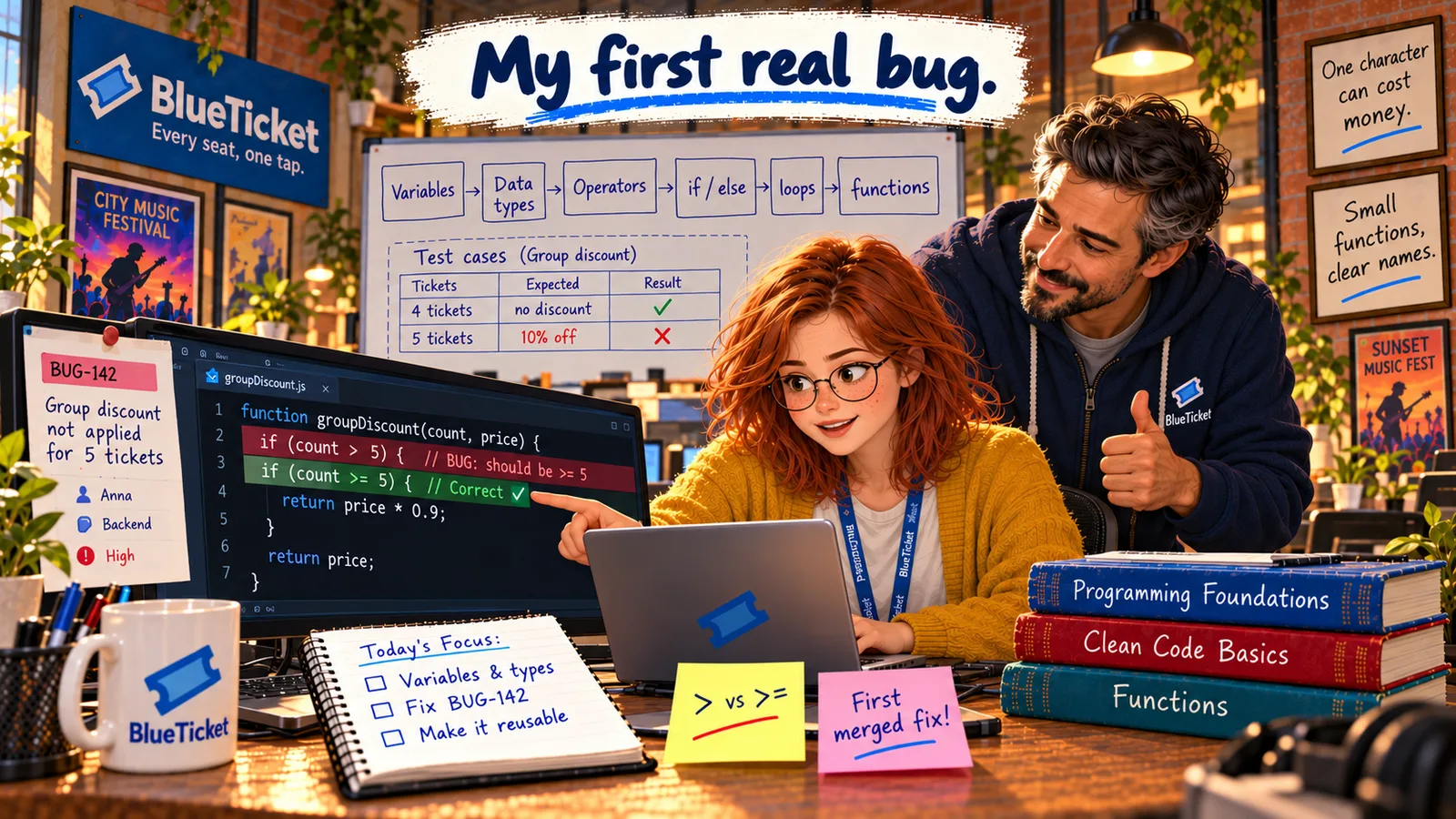
Deeper in the pricing code, Anna finds the line that decides the discount:
if (count > GROUP_SIZE) { price = price * 0.9; }
She reads it out loud, slowly. "If the count is greater than five, give ten percent off." Then she stops. "Greater than five. So six or more. But the website promises five or more."
| Tickets | Website promise | Code gives |
|---|---|---|
| 4 | No discount | No discount ✓ |
| 5 | 10% off | No discount ✗ |
| 6 | 10% off | 10% off ✓ |
Five isn't greater than five. That's the whole bug — one missing character.
Anna
"Greater Than" vs. "Greater Than or Equal To"
One character, real money
> and >= differ by one symbol — and by every group of exactly five customers.
Edges are where bugs live
The code is right for 4 and 6 tickets. It's wrong only at exactly 5 — the edge of the rule.
Expressions and Operators
An expression is any piece of code that produces a value. 2 + 3 is an expression (it produces 5). count > 5 is an expression (it produces true or false). Even a single variable like price is an expression. Programs are built from expressions joined together.
An operator is the symbol that does the work in an expression — like + or >. There are four groups you'll use constantly:
- Arithmetic operators: do maths.
+add,-subtract,*multiply,/divide, and%(called modulo), which gives the remainder after dividing:7 % 3is1. Modulo is handy for questions like "is this number even?" (n % 2 === 0). - Comparison operators: compare two values and always produce a boolean (
trueorfalse).>greater than,<less than,>=greater than or equal to,<=less than or equal to,===equal to,!==not equal to. - Logical operators: combine booleans.
&&(AND) is true only if both sides are true.||(OR) is true if at least one side is true.!(NOT) flips true to false and false to true. - Assignment operators: store values.
=puts a value into a variable. Shortcuts combine a calculation with assignment:count += 1meanscount = count + 1;price *= 0.9meansprice = price * 0.9.
| Group | Operators | Example | Result |
|---|---|---|---|
| Arithmetic | + - * / % | 10 % 3 | 1 |
| Comparison | > < >= <= === !== | 5 >= 5 | true |
| Logical | && || ! | true && false | false |
| Assignment | = += -= *= | count += 1 | count goes up by 1 |
| A | B | A && B | A || B | !A |
|---|---|---|---|---|
| true | true | true | true | false |
| true | false | false | true | false |
| false | true | false | true | true |
| false | false | false | false | true |
| Tickets | Website promise | Code gives |
|---|---|---|
| 4 | No discount | No discount ✓ |
| 5 | 10% off | 10% off ✓ |
| 6 | 10% off | 10% off ✓ |
const GROUP_SIZE = 5;const GROUP_DISCOUNT = 0.9; // pay 90% = 10% off// Before (wrong): only 6 or more tickets got the discountif (count > GROUP_SIZE) { price = price * 0.9; }// After (right): 5 or more tickets get the discountif (count >= GROUP_SIZE) { price = Math.round(price * GROUP_DISCOUNT); }
Math.round keeps the price a whole number of cents, as Act 03 taught.
Order matters: like in school maths, * and / happen before + and -. So 2 + 3 * 4 is 14, not 20. When in doubt, use brackets: (2 + 3) * 4 is 20. Brackets also make code easier to read.
Strict vs. loose equality in JavaScript: JavaScript has two equality operators. === (strict) checks that the value and the type are the same. == (loose) tries to convert types first, so "5" == 5 is true — which hides bugs like the one in the last chapter. Always use === and !==.
The fix for BUG-142 is one character: change > to >=. Now 5 tickets gets the discount, and so does everything above. Anna also replaces 0.9 with a named constant, GROUP_DISCOUNT, so the next reader instantly knows what the number means.
John adds one lesson that will come back all year: test the edges. Bugs hide at the exact boundary of a rule — 5 tickets, midnight, the last seat, an empty cart. Checking 4, 5 and 6 tickets would have caught this bug before any college paid too much.
Key Takeaway
An expression is any code that produces a value; operators do the work inside it — arithmetic (+ - * / %), comparison (> < >= <= === !==), logical (&& || !) and assignment (= += *=). Comparison bugs usually sit at the exact edge of a rule, so always test the boundary values.
Why This Matters
Almost every business rule in software is an expression: "5 or more tickets," "paid AND not cancelled," "student OR under 18." Getting one operator wrong quietly charges people the wrong amount or lets the wrong person in. Reading operators carefully, and testing the edges, is one of the most valuable habits a developer can have.
The bug is found and fixed. But while testing, Anna notices the pricing code only looks at one ticket at a time, and the group rule is tangled up with the student rule in a confusing way. To clean it up, she needs to understand how code makes decisions and repeats work.