

In this chapter
We'll look inside a relational database: tables, rows and columns (like tidy spreadsheets), primary keys (a passport number for every row), foreign keys (a reference to a row in another table) — and SQL, the language for asking.
The Problem in Real Life
John opens a database tool on Anna's screen. On the left: a list of names — events, seats, fans, bookings. He clicks seats, and a grid appears that looks a lot like a spreadsheet: columns across the top (id, event_id, row, number, price_cents, state) and thousands of rows below.
"It looks like Excel," Anna says. "Yes," says John. "With a few very strict rules that Excel doesn't have — and those rules are the whole point."
So a database is just a set of very strict spreadsheets?
Anna
A Loose Spreadsheet vs. Tables With Strict Rules
Data needs a shape
Every seat has the same kinds of information. Tables give that information a fixed, predictable shape.
Every row needs a unique name
Two seats can both be "Row C, number 14" at different events. Something has to tell them apart.
Tables point to each other
A booking belongs to a seat and a fan. The database needs a reliable way to connect them.
Tables, Rows, Columns and Keys
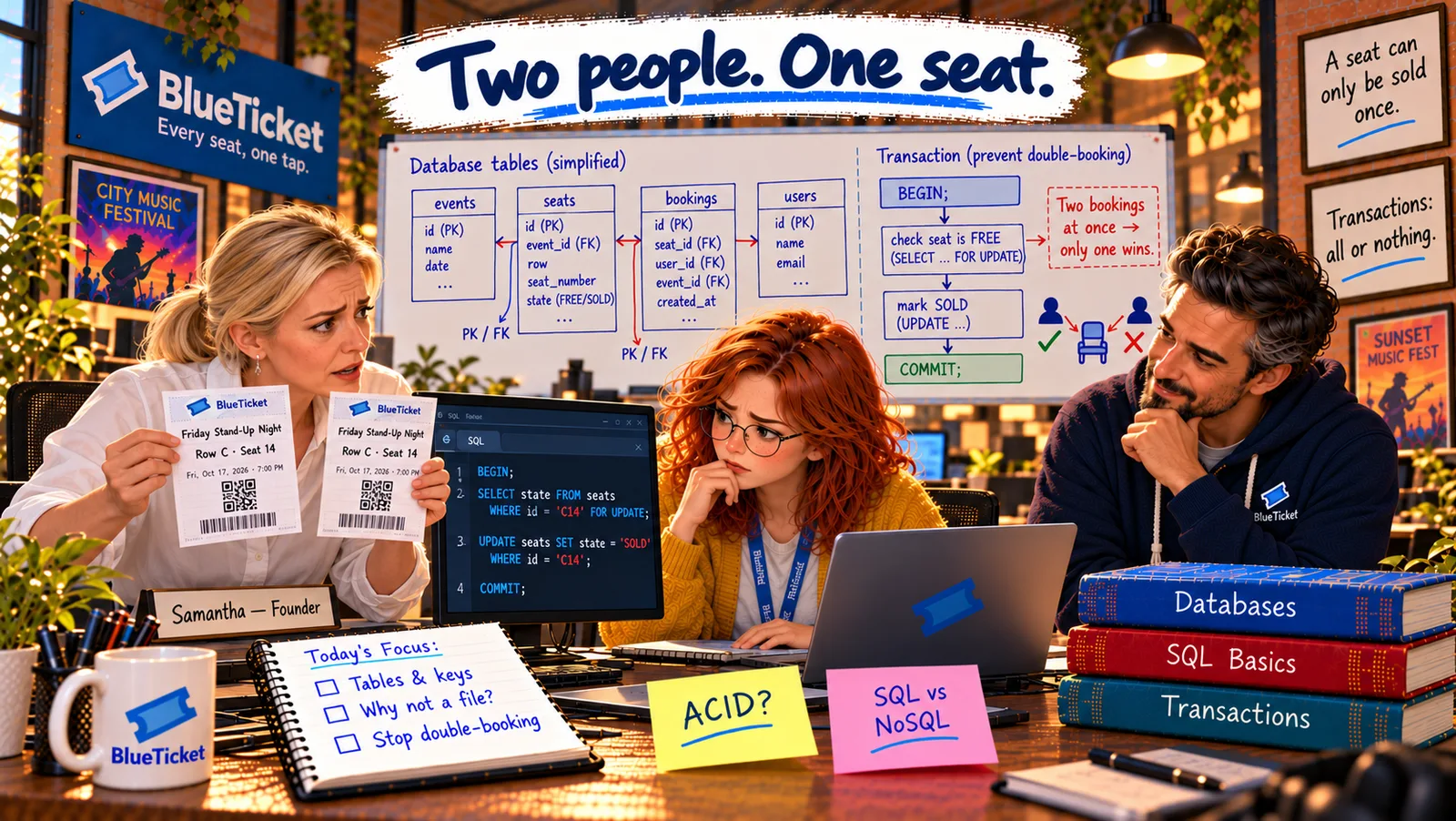
A relational database stores data in tables that are related to each other. "Relational" comes from those relations — the links between tables. PostgreSQL, which BlueTicket uses, is a relational database.
- Table — one sheet for one kind of thing: a table holds data about one kind of thing:
events,seats,fans,bookings. Like one tab in a spreadsheet, but strict about its shape. - Column — one kind of detail, with a fixed type: each column is one piece of information every row has, like
row,numberorprice_cents. Every column has a data type (Act 07):price_centsmust be an integer,rowmust be text,created_atmust be a date and time. Try to put "abc" intoprice_centsand the database refuses — unlike a spreadsheet, which would happily accept it. - Row — one record: each row is one thing of that kind: one seat, one fan, one booking. Seat C14 at the Friday show is one row in
seats. - Primary key — a passport number for every row: a primary key is a column (often called
id) whose value is unique for every row and never empty. Two seats can both be "Row C, number 14" at different events, but each has its ownid, like two people with the same name but different passport numbers. The database guarantees no two rows ever share one. - Foreign key — writing someone's passport number on a form: a foreign key is a column that stores the primary key of a row in another table, to link them. A booking row has
seat_id = 5021andfan_id = 77, meaning "this booking is for seat 5021, by fan 77." And the database checks it: you can't create a booking for seat 99999 if no such seat exists. That check is called referential integrity.
| id | event_id | row | number | price_cents | state |
|---|---|---|---|---|---|
| 5020 | 42 | C | 13 | 4999 | SOLD |
| 5021 | 42 | C | 14 | 4999 | SOLD |
| 5022 | 42 | C | 15 | 4999 | FREE |
| 8801 | 57 | C | 14 | 3500 | FREE |
Seat C14 appears twice — at event 42 and event 57 — but each has its own primary key (5021 and 8801).
| id | seat_id | fan_id | paid_at |
|---|---|---|---|
| 90001 | 5020 | 77 | 2026-11-13 18:01 |
| 90002 | 5021 | 12 | 2026-11-13 18:02 |
seat_id 5021 means "Row C, seat 14 at event 42" — the database guarantees seat 5021 really exists.
| Feature | Spreadsheet | Relational table |
|---|---|---|
| Column types | Anything goes in any cell | Each column has a fixed type |
| Unique ID per row | Up to you | Primary key, enforced |
| Links to other sheets | Copy-pasted values | Foreign keys, checked |
| Many people editing at once | Conflicts and overwrites | Handled safely |
| Size | Gets slow at tens of thousands of rows | Millions of rows are normal |
BlueTicket's core tables and how they link
events
id (primary key), name, date, venue
seats
id, event_id → events.id, row, number, price_cents, state
bookings
id, seat_id → seats.id, fan_id → fans.id, paid_at
fans
id, name, email
Read it out loud: "select the row and number from seats where the event is 42 and the seat is free."
SELECT row, number, price_centsFROM seatsWHERE event_id = 42AND state = 'FREE'ORDER BY row, number;
SQL — asking the librarian precisely: you talk to a relational database in SQL (Structured Query Language, often said "sequel"). SQL reads almost like English: SELECT row, number FROM seats WHERE event_id = 42 AND state = 'FREE' means "show me the row and number of every free seat at event 42." You describe what you want; the database figures out how to find it. Almost every relational database speaks SQL, with small differences.
Anna reads the four tables and sees the shape of BlueTicket for the first time. An event has many seats. A seat belongs to one event. A fan can make bookings. A booking points to one seat and one fan. Every link is a foreign key. And that's exactly where the kiosk went wrong: its file had its own list of seats and sales, with no foreign keys and no checks — just text. Nothing stopped it from selling a seat the database already knew was sold.
Key Takeaway
A relational database stores data in tables — one per kind of thing — made of typed columns (details) and rows (records). A primary key is a unique ID for each row, like a passport number; a foreign key stores another table's primary key to link rows, and the database checks those links are real. SQL is the language for asking: you say what you want, the database finds it.
Why This Matters
Tables, primary keys and foreign keys are the vocabulary of almost every business system — banks, shops, hospitals, airlines and BlueTicket. Reading a table's shape tells you how a whole system thinks. BizTechLab's Relational Databases course builds all of this step by step, from a shop's notebook to a production database.
Anna can read a table now. But she notices something odd in an old table called bookings_archive: every row repeats the venue's full name and address. Thousands of copies of the same address. Why is that a problem — and how should tables be split?