

In this chapter
We'll see what memory really looks like to a program — a giant hotel of numbered rooms — and learn what an address is, how variables use memory, and the difference between passing a value and passing a reference.
The Problem in Real Life
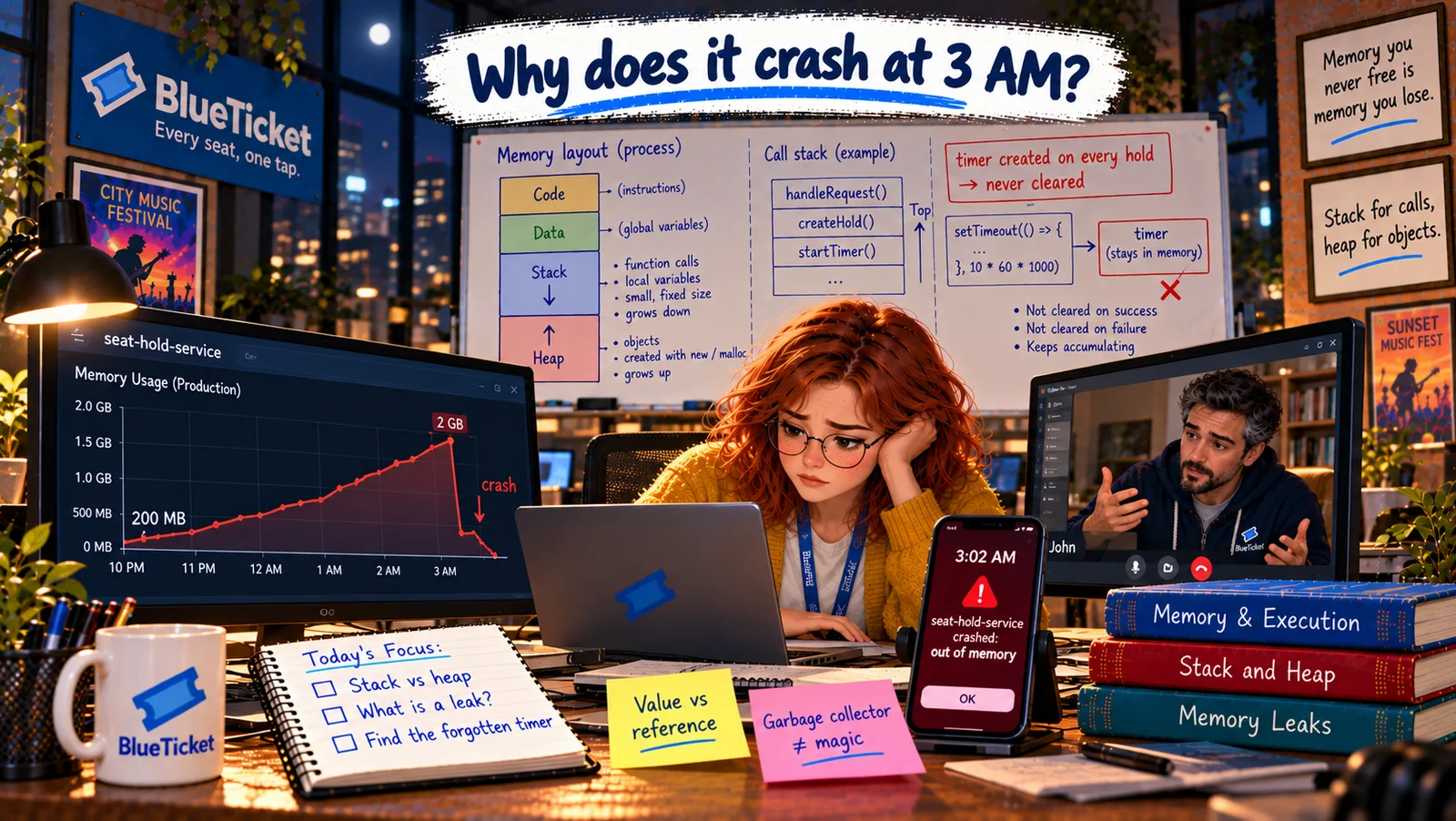
Week ten. Anna's phone buzzes at 3:02 AM: seat-hold-service crashed: JavaScript heap out of memory. The service restarts on its own, but for four minutes nobody could hold a seat.
The next night, it happens again. And the night after — always between 3 and 4 AM. In the morning, John pulls up the memory graph for the service: a line that starts at 200 MB after each restart and climbs, slowly and steadily, all day and all night, until it hits 2 GB and the service dies.
"It's like the service is filling up," Anna says. "But with what?"
To find what's filling it, you first need to see what memory actually looks like from inside a program.
John
"The Computer Remembers Things" vs. How Memory Is Really Organised
Memory keeps growing
Something in the service keeps taking memory and never gives it back.
Memory is invisible
You can't see memory the way you see a file. You need a mental picture of it.
Copy or share?
Sometimes a variable holds its own copy of data; sometimes it points to shared data. Mixing them up causes bugs.
Memory, Addresses and Variables
In Act 02 we met RAM — the computer's working memory, the "desk." Now let's zoom right in and see what it looks like to a running program.
The hotel analogy: imagine a gigantic hotel with billions of tiny rooms in one long corridor. Every room has a number on its door, starting from 0. Each room holds exactly one small thing — one byte. That's memory: a huge row of numbered boxes, each holding one byte.
Address — the room number: the number on a room's door is its address. To read or write any data, the CPU says "give me what's in room 1,048,576" or "put this in room 1,048,577." Addresses are often shown in hex (Act 03), like 0x7ffe3a10. Bigger things — a number, a name, a seat — take several rooms side by side.
Variable — a name tag on the door: remembering room numbers would be painful, so programming languages let you stick a name tag on the door instead. When you write let count = 5;, the language finds a free room (or a few), puts 5 inside, and lets you use the name count from then on. A variable is a friendly name for a place in memory. You never see the room number — but it's always there.
- Value — handing over a photocopy: if you give a friend a photocopy of your notes, they can scribble all over it and your original stays clean. When a variable holds a value directly — like a number or a true/false — copying it to another variable makes an independent copy. Changing one doesn't touch the other.
- Reference — handing over your home address: now imagine instead of a copy, you give your friend your home address and say "the notes are on my desk." If they go there and scribble on them, your notes change, because there's only one set. A reference is like that address: a variable that doesn't hold the data itself, but tells you where the data lives. Copy the reference, and now two variables point to the same data.
- In JavaScript: simple values — numbers, strings, booleans — are copied as values. Objects and arrays are handled by reference. So if
seatAis an object and you writeconst seatB = seatA, there's still only one seat in memory; both names point to it.
| Hotel | Memory | Example |
|---|---|---|
| A tiny room | One byte of memory | Holds a number from 0 to 255 |
| Room number on the door | Address | 0x7ffe3a10 |
| Name tag on the door | Variable name | count |
| What's inside the room | The value | 5 |
| A note saying "see room 2048" | A reference | A variable pointing to an object |
| Feature | Value (photocopy) | Reference (home address) |
|---|---|---|
| What the variable holds | The data itself | Where the data lives |
| Copying the variable | Makes an independent copy | Makes a second name for the same data |
| Changing through the copy | The original is not affected | The original changes too |
| In JavaScript | Numbers, strings, booleans | Objects and arrays |
// Values are copiedlet a = 5;let b = a; // b gets its own copyb = 6;console.log(a); // 5 — unchanged// Objects are shared by referenceconst seat = { id: "C14", state: "FREE" };const previous = seat; // NOT a copy — a second nameseat.state = "HELD";console.log(previous.state); // "HELD" — same object!// A real copyconst snapshot = { ...seat }; // a new object with the same propertiesseat.state = "SOLD";console.log(snapshot.state); // "HELD" — the copy kept the old value
Why this matters — a classic bug: Anna remembers a weird bug from last month. A developer wrote const previous = seat; to "save" the old seat before changing it, then changed seat.state to HELD. The "saved" previous.state was HELD too — because previous was never a copy, just a second name for the same seat. To really copy an object, you create a new one: const previous = { ...seat }; (the ... copies its properties into a new object).
Back to the crash: John explains why this matters for tonight's bug. As long as any variable, list or object still holds a reference to a piece of data, that data is "in use" and must stay in memory. If the service keeps references to things it no longer needs, those things can never be thrown away — and memory fills up. That's the most likely shape of the 3 AM crash. The rest of this Act is about finding exactly which references are being kept, and why.
Key Takeaway
Memory is a huge row of numbered rooms, each holding one byte; a room's number is its address. A variable is a name tag on a room. A value is like handing over a photocopy — an independent copy. A reference is like handing over an address — two names for the same data. Data stays in memory as long as anything still references it.
Why This Matters
Value vs. reference explains a whole family of surprising bugs — data that "changes by itself," or old data that refuses to go away. And the idea that data lives as long as something references it is the key to every memory leak, including the one taking down BlueTicket's seat-hold service every night.
Anna has the picture: rooms, addresses, name tags, references. But a running program doesn't use memory in one big pile. It splits it into two very different areas — one tidy and automatic, one big and flexible. The leak is hiding in one of them.