

In this chapter
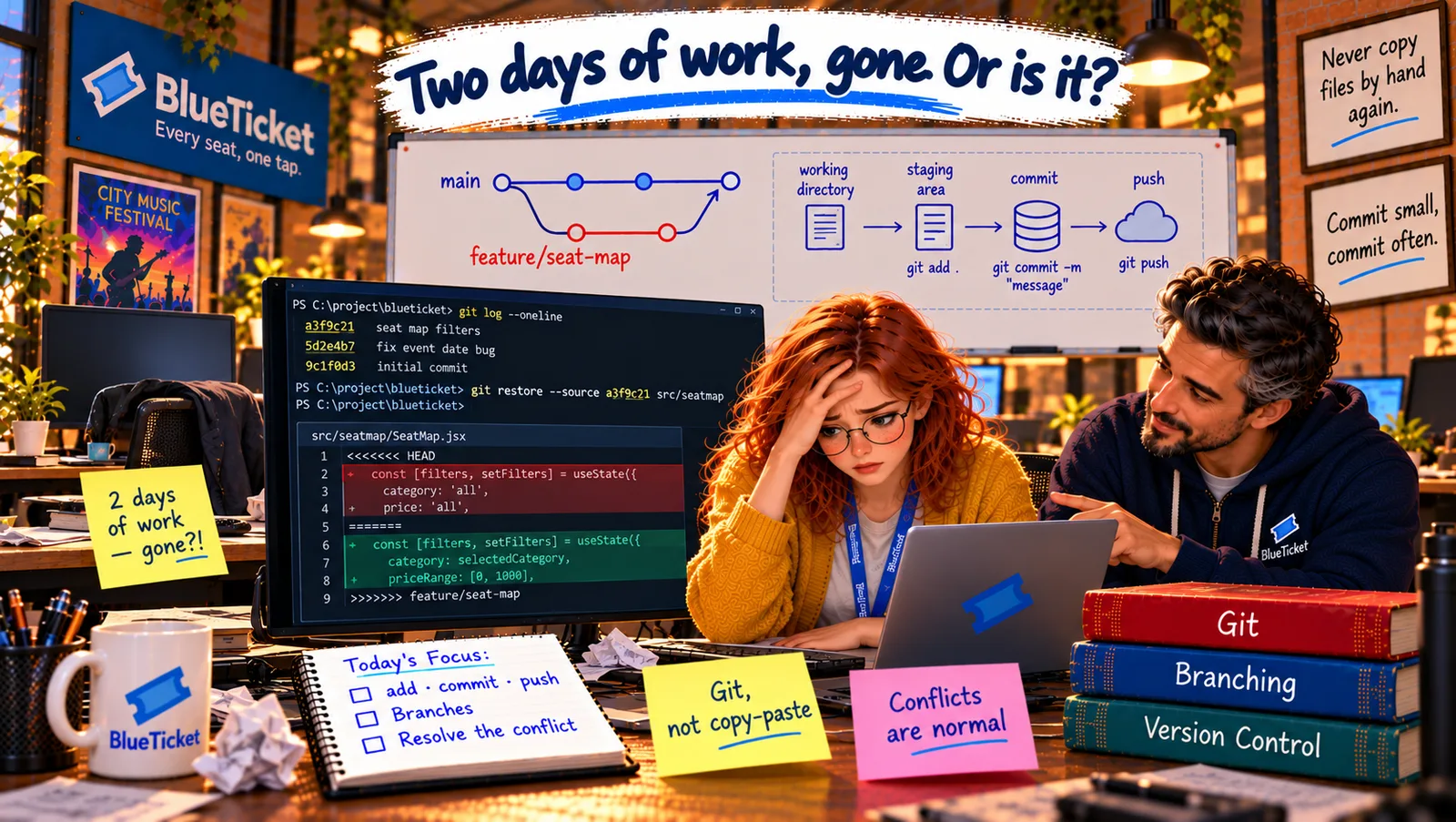
We'll learn the three places your changes live in Git — the working directory, the staging area and commits — explained as packing and sending a parcel, then use the history to bring back Liam's two days of work.
The Problem in Real Life
John opens a terminal in the project. "Before we fix anything, I want you to see what Git sees." He types git log --oneline, and a list appears — every save point, newest first, each with a short code and a message.
At the top is Anna's from twenty minutes ago: "Update seat map." Just below it: Liam's two from this morning. "Each line is a commit," John says. "To understand how it got there, you need to know about three places."
So when I "saved" my change, Git didn't just save my files — it saved a whole new version of the project?
Anna
Saving a File vs. Making a Commit
Three places, not one
A change moves from your files, to a "ready" area, to the permanent history.
You choose what goes in
You decide exactly which changes become part of each save point.
Every commit is a snapshot
Each commit records the whole project at that moment, so any of them can be brought back.
The Working Directory, the Staging Area and Commits
The parcel analogy: imagine sending a parcel. First, things are spread across your desk while you work on them. Then you choose which ones go into the box. Finally you seal the box, write a label saying what's inside and who it's from, and it goes into the post office's permanent records. Git works in exactly these three steps.
- Working directory — your desk: the actual files and folders you see and edit in your code editor. When you change a file, the change is only on your desk. Git notices it ("this file was modified"), but hasn't recorded anything yet.
- Staging area — the open box: a holding area where you put the changes you want in your next save point. You add changes with
git add. This lets you choose: maybe you changed five files, but only three belong to this fix — you put only those three in the box. (It's also called the index.) - Commit — the sealed, labelled parcel: a commit is a permanent save point of everything in the staging area, made with
git commit. It records a snapshot of the project, your name and email, the date, and a message saying what changed and why. Once committed, it's part of the history. - Commit hash — the parcel's tracking number: every commit gets a unique ID, a long string of letters and digits like
a3f9c21e7b...(usually shown shortened to the first 7, likea3f9c21). It's calculated from the commit's contents, so it identifies that exact save point forever.
| Sending a parcel | Git | Command |
|---|---|---|
| Things spread on your desk | Working directory | (edit files) |
| Choosing what goes in the box | Staging area | git add |
| Sealing and labelling the box | Commit | git commit -m "message" |
| The tracking number | Commit hash | a3f9c21 |
| The post office's records | History | git log |
| Hash | Author | Message |
|---|---|---|
| e81b4d0 | Anna | Restore seat-map filters overwritten in previous commit |
| 7c2a9f1 | Anna | Update seat map |
| a3f9c21 | Liam | Add price filter to seat map |
| 5d10b7e | Liam | Add section filter to seat map |
From your desk to the history
Working directory
your desk — files you edit
Staging area
the open box — changes chosen for the next commit
Commit
sealed parcel: snapshot + author + date + message + hash
History
a chain of commits — git log
git status # what's changed on my desk and in the box?git diff # show the exact lines changedgit log --oneline # the history, newest first# 7c2a9f1 Update seat map# a3f9c21 Add price filter to seat map# 5d10b7e Add section filter to seat map# Put the seat-map folder back exactly as it was in Liam's commitgit restore --source a3f9c21 src/seatmapgit add src/seatmapgit commit -m "Restore seat-map filters overwritten in previous commit"
git restore changes files on your desk only. Nothing is committed until you add and commit again.
Why the staging area exists: it lets you make clean, focused commits. A commit should be one logical change — "Fix group discount for 5 tickets" — not "various stuff I did today." Small, focused commits make the history easy to read, review and undo.
What went wrong this morning: when Anna pasted the old folder, her working directory now held old versions of Liam's files. She ran git add . ("put everything that changed in the box") and committed it without looking. Git did exactly what it was told: it made a new snapshot containing the old files. John shows her the lesson: before every commit, run git status and git diff to see exactly what's going in the box. She would have seen Liam's filter code being deleted.
Bringing Liam's work back: because every commit is a full snapshot, getting files back from an earlier commit is easy. John finds Liam's latest commit, a3f9c21, and runs git restore --source a3f9c21 src/seatmap: "put the seat-map folder on my desk exactly as it was in commit a3f9c21." Liam's filters reappear in the editor. They check the changes with git diff, add them to the box, and commit: "Restore seat-map filters overwritten in previous commit." Two days of work, back in under a minute. Liam breathes again.
Key Takeaway
Git changes move through three places, like sending a parcel: the working directory is your desk (the files you edit), the staging area is the open box (git add chooses what goes in), and a commit is the sealed, labelled parcel (git commit saves a permanent snapshot with a message and a unique hash). Because every commit is a snapshot, you can restore files from any of them.
Why This Matters
The three-place model is the key to understanding everything else in Git. Almost every Git confusion — "why isn't my change in the commit?", "why did that file get committed?" — is about which place a change is in. And the habit of checking git status and git diff before every commit prevents exactly the kind of accident Anna had this morning.
Liam's work is restored — on Anna's laptop. But Liam works on his laptop, and the rest of the team on theirs. How do all those copies of the repository stay in sync? Through a shared copy that everyone pushes to and pulls from.