

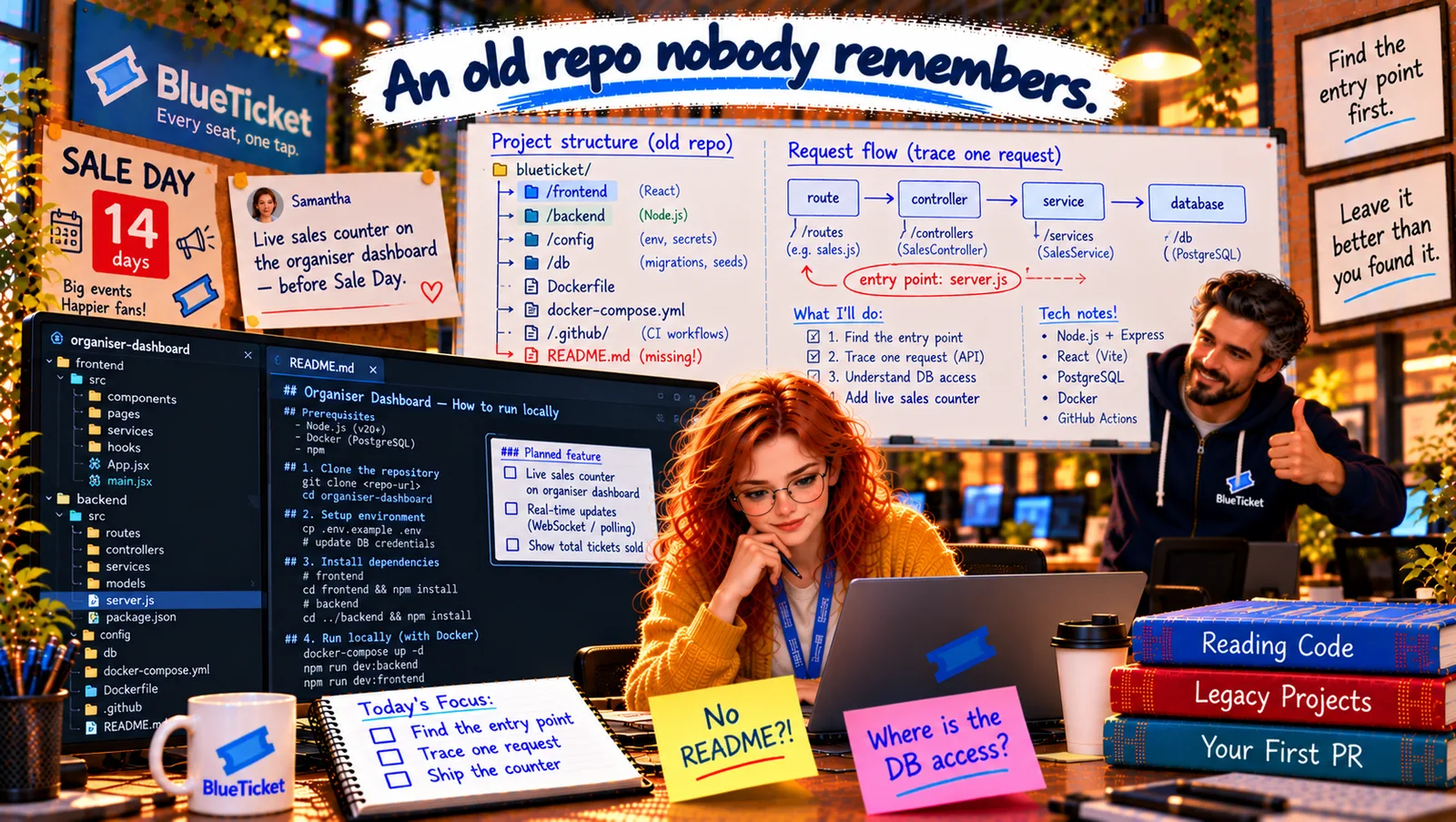
In this chapter
We'll learn a reliable method for reading code you didn't write — read with a question, start at the entry point, find the configuration, endpoints and database access, use search and go-to-definition, check the history, and keep notes — explained as exploring a new city with a map and one destination.
The Problem in Real Life
Anna opens server.js and starts reading. Line 1, line 2... by line 80 she's opened six other files, she's reading a CSV export function that has nothing to do with her task, and she's forgotten why she started.
John laughs kindly. "Everyone does that. Reading code isn't like reading a book. You don't start on page one. You start with a question — and you only read what answers it."
Read with a question. Stop when it's answered.
John
Reading Every File vs. Reading With One Question
Rabbit holes
Every function calls three others. Following them all means never finishing.
Strange decisions
Old code is full of odd choices. Some are mistakes; some had good reasons nobody wrote down.
Forgetting what you learned
Without notes, you re-read the same files tomorrow.
Reading an Unfamiliar Codebase: Entry Point, Configuration, Endpoints, Database Access
The new city analogy: arriving in a city you don't know, you don't walk down every street. You have one destination — your hotel. You find where you are (the station), look at the map, follow the main roads, ask "is this the right way?" at each turn, and ignore the side streets. Next day, with a new destination, you learn a bit more of the city. Reading code works the same way.
- Read with a question: decide what you need to know before you open a file: "Where are sales numbers calculated?" "What happens when an organiser opens the dashboard?" Read only what answers it. Note other interesting things for later — and move on.
- Finding the entry point — the station: the entry point is where the program starts. Look at: the
startscript andmainfield inpackage.json, the Dockerfile'sCMD, files namedserver.js,index.js,main.py,app.py,Main.java,Program.cs. In a web backend, the entry point usually creates the app, loads configuration, connects to the database, registers middleware and routes, and starts listening on a port (Act 19). It's the table of contents for the backend. - Finding configuration: search for
process.env(oros.environ,getenv) and the config folder. List every variable the code actually reads — that's the real list, whatever.env.samplesays. - Finding API endpoints and database access: from chapter two — routes via router definitions, database access via the query calls. For a feature, find the endpoint the frontend calls (search the frontend for
fetch(or the URL) and follow it to the database. - Navigate, don't scroll: use your editor's go to definition (jump to where a function is defined), find all references (everywhere it's used) and search across files. Follow the main road; skip the side streets.
- Read the history for the "why":
git blameon a strange line shows who changed it and the commit message (Act 15), often linking an issue.git log -p path/to/fileshows how a file evolved. Mark's "temporary fix for sales export" makes much more sense once you read the issue it links. - Assume good reasons, check them: odd code often exists for a reason — a bug workaround, a customer requirement. Before "cleaning it up", find out why. If you can't, leave it, and write a note or ask.
- Keep notes and draw a map: as you go, write down what each part does (Act 24's notes habit) and sketch the main flow. Tomorrow-you, and the next person, will thank you.
| Stack | Look at |
|---|---|
| Node.js | package.json start/main, Dockerfile CMD, server.js, index.js, app.js |
| Python | main.py, app.py, manage.py (Django), wsgi.py, Dockerfile CMD |
| Java / Spring | The class with main() and @SpringBootApplication |
| C# / .NET | Program.cs |
| Frontend (React/Vite) | index.html → src/main.jsx → App.jsx |
| Tool | City version | Use it to... |
|---|---|---|
| Go to definition | Follow this road | Jump to where a function is defined |
| Find all references | Where does this road lead from? | See everywhere it's used |
| Search across files | Look up a street name | Find text anywhere in the project |
| git blame | Ask a local | See who changed a line, when and why |
| Breadcrumbs / outline | The district map | See a file's structure at a glance |
const config = require("../config"); // 1. settingsconst express = require("express");const app = express(); // 2. create the appapp.use(require("./middleware/logger")); // 3. middlewareapp.use(express.json());app.use("/api", require("./routes")); // 4. routes under /apiapp.use(require("./middleware/errors")); // 5. error handlerapp.listen(config.port, () => // 6. start listeningconsole.log(`organiser-dashboard listening on ${config.port}`));
Anna's second try: question: "How does the dashboard get its sales numbers?" (1) In frontend/src/pages/Dashboard.jsx, she searches for fetch( → it calls /api/events/${eventId}/sales. (2) In backend/server.js — the entry point — she finds app.use("/api", routes). (3) Go to definition → routes/sales.js. (4) Go to definition again → controller → service → db.query. She stops there. Question answered, in fifteen minutes, without reading the CSV export at all. Next chapter: she follows that path properly, line by line.
The entry point, summarised: server.js loads config, creates the Express app, adds the logger and JSON middleware, mounts /api routes, adds an error handler, and listens on port 4000. She writes those six lines in her notes — they'll go straight into the README.
Key Takeaway
Read an unfamiliar codebase like exploring a new city with one destination: start with a question and read only what answers it. Find the entry point (start script, Dockerfile CMD, server.js/main.py) — it's the backend's table of contents. List the real configuration by searching for environment reads, find endpoints and database access, and follow the main road with go-to-definition and find-references. Use git blame and log for the why, assume odd code had a reason until proven otherwise, and keep notes.
Why This Matters
Reading code is a bigger part of the job than writing it, and doing it with a method — a question, the entry point, search, navigation, history and notes — is what lets experienced developers become productive in a new codebase in days rather than months. It's also a common practical interview: "here's a repo, find X."
Anna has found the path from the dashboard to the database. Now she walks it slowly — one request, every step — because that path is exactly where her live counter will go.