

In this chapter
We'll learn why security matters for every developer, what attackers actually want, and the three ideas everything else is built on — identity, authentication and authorization — explained as an airport's passport, passport check and boarding pass.
The Problem in Real Life
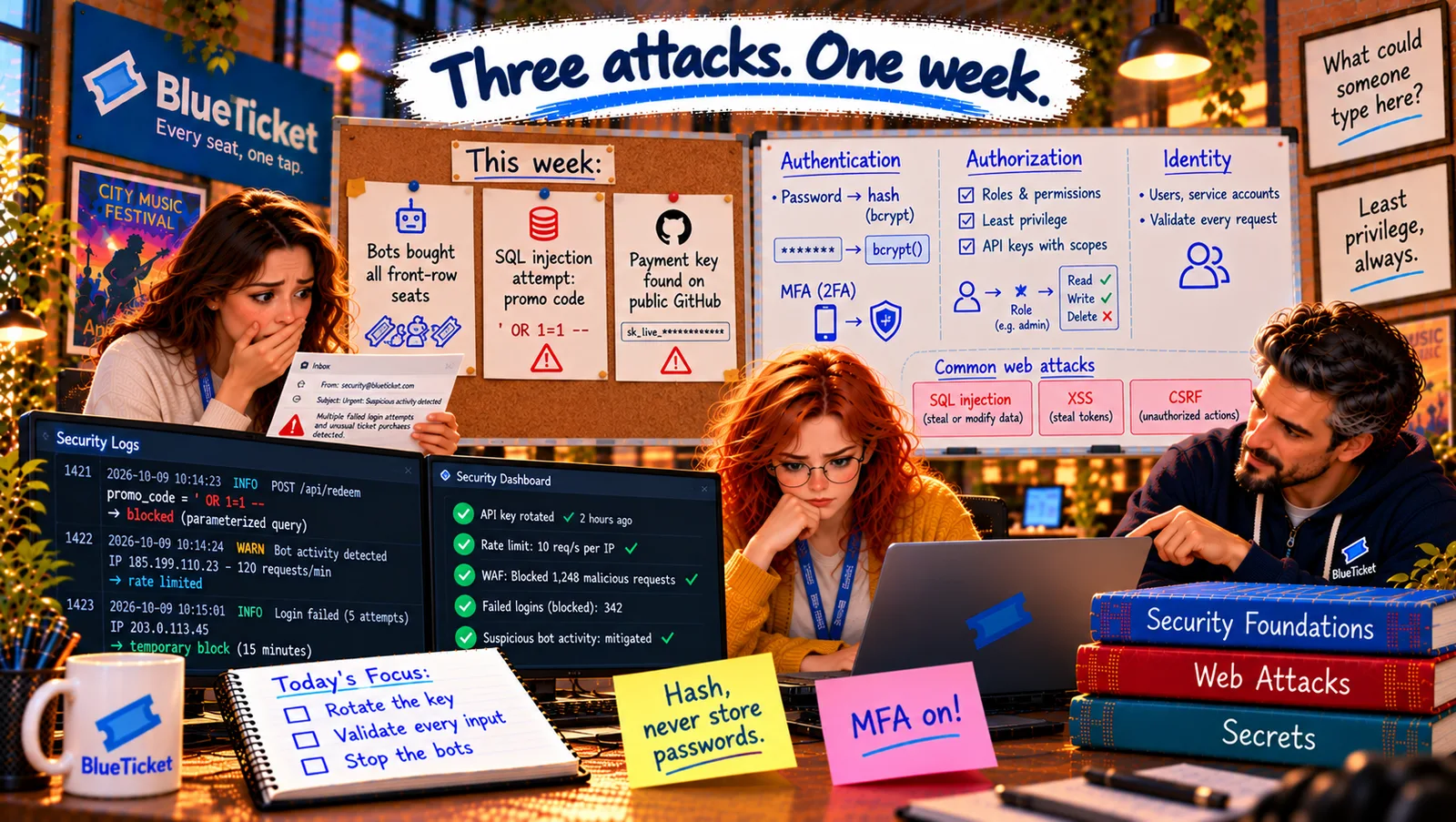
Month ten. On Monday at 10:00 AM, tickets for the Northern Lights tour go on sale. By 10:00:40, every front-row seat in every city is sold. By lunchtime, the same seats appear on resale sites at five times the price. The "fans" who bought them were bots: programs pretending to be people, buying faster than any human could click.
On Tuesday, Anna notices strange text in the logs, typed into the promo-code box: ' OR 1=1 --. On Thursday morning, Samantha gets an email from the payment provider: "Your live API key was found in a public GitHub repository. Please act immediately."
Samantha calls the team together. "Three attacks in one week. Are we being targeted?" John shakes his head. "Not specially. Every website with money is attacked every day. This week, we just noticed. From now on, security is everyone's job — starting with three words."
Attackers don't need to be clever every time. We need to be careful every time.
John
"Nobody Would Attack Us" vs. Expecting Attacks Every Day
Money attracts attackers
Tickets, payments and customer data are worth money to criminals — even at a small company.
Attacks are automated
Most attacks are bots trying the same tricks on thousands of sites, all day, every day.
Who is this, and what may they do?
Every request must answer two questions before anything else happens.
Why Security Matters: Identity, Authentication and Authorization
Why security matters: a security failure can mean stolen money (refunds to criminals, fraud), stolen data (fans' names, emails and payment details), broken trust (fans and venues leave), and legal trouble — data-protection laws like Europe's GDPR fine companies that don't protect personal data. And security isn't a separate team's job: most security holes are ordinary bugs written by ordinary developers.
What we protect — three goals: keep data secret from people who shouldn't see it (confidentiality), keep it correct so nobody can change it without permission (integrity), and keep the system working for real users (availability — the bots took that from real fans on Monday).
The airport analogy: at an airport, your passport says who you are. At the passport check, an officer confirms the passport is really yours. Then your boarding pass decides what you're allowed to do: board this flight, at this gate — not every plane in the airport. Software security starts with the same three steps.
- Identity — who you claim to be (the passport): an identity is who a user (or a program) is in the system: an account with a unique ID, an email, a role. "Fan #48213", "venue manager at Riverside Arena", "the email worker".
- Authentication — proving it (the passport check): authentication (often "authn") checks that you really are that identity: a password, a code from your phone, a fingerprint, a security key. After authentication, the system knows who you are.
- Authorization — what you may do (the boarding pass): authorization ("authz") decides what that identity is allowed to do: a fan can see their own orders; a venue manager can see sales for their venue; only admins can issue refunds. It must be checked on the server, on every request (Act 12).
- Authentication isn't authorization: being logged in doesn't mean you can do everything. A classic bug: the order page
/orders/1001checks that you're logged in, but not that order 1001 is yours. Change the number to 1002 and you see a stranger's order. Broken authorization like this is the most common serious web vulnerability in the world.
| Idea | Airport version | Question it answers | BlueTicket example |
|---|---|---|---|
| Identity | Passport | Who do you claim to be? | Fan #48213, anna@blueticket.example |
| Authentication | Passport check | Can you prove it? | Password + code from your phone |
| Authorization | Boarding pass | What may you do? | See your own orders, not others' |
| Day | What happened | What was attacked |
|---|---|---|
| Monday | Bots bought every front-row seat in 40 seconds | Availability for real fans |
| Tuesday | ' OR 1=1 -- typed into the promo-code box | The database (integrity, secrecy) |
| Thursday | Live payment key found on public GitHub | Money and payment data |
Anna checks BlueTicket: she tries exactly that classic bug on staging — logged in as a test fan, she opens /api/orders/1001, then changes it to an order that belongs to another test fan. The server correctly says 403 Forbidden (Act 12): the code checks order.userId === currentUser.id. Good. But the bots on Monday didn't break any lock. They had real accounts and did exactly what fans do — just thousands of times faster. That's a different problem, and this Act will come back to it.
The plan for the week: John writes three cards on a corkboard: "Bots bought all front-row seats", "SQL injection attempt: promo code", "Payment key found on public GitHub". "We'll fix all three. But first, Anna learns how logins actually work — because that's where most attacks start."
Key Takeaway
Security protects money, data, trust and legal standing — and most holes are ordinary developer bugs. Keep data secret, correct and available. Every request answers three questions, like an airport: identity (the passport — who you claim to be), authentication (the passport check — proving it) and authorization (the boarding pass — what you may do), checked on the server every time. Logged in never means allowed to do everything.
Why This Matters
Security is part of every developer's job, not a specialist add-on. Understanding identity, authentication and authorization — and that they're different — prevents the most common serious vulnerabilities, and comes up in nearly every backend interview.
Authentication usually starts with a password. Anna has typed thousands of them. But she's never asked what BlueTicket actually does with a password after a fan presses "Log in".