

In this chapter
We'll learn how to get your bearings in a repository you've never seen — the usual folders for frontend, backend and configuration, environment files, the dependency list and whatever documentation exists — explained as walking into an unfamiliar house and finding the rooms, the fuse box and the water pipes.
The Problem in Real Life
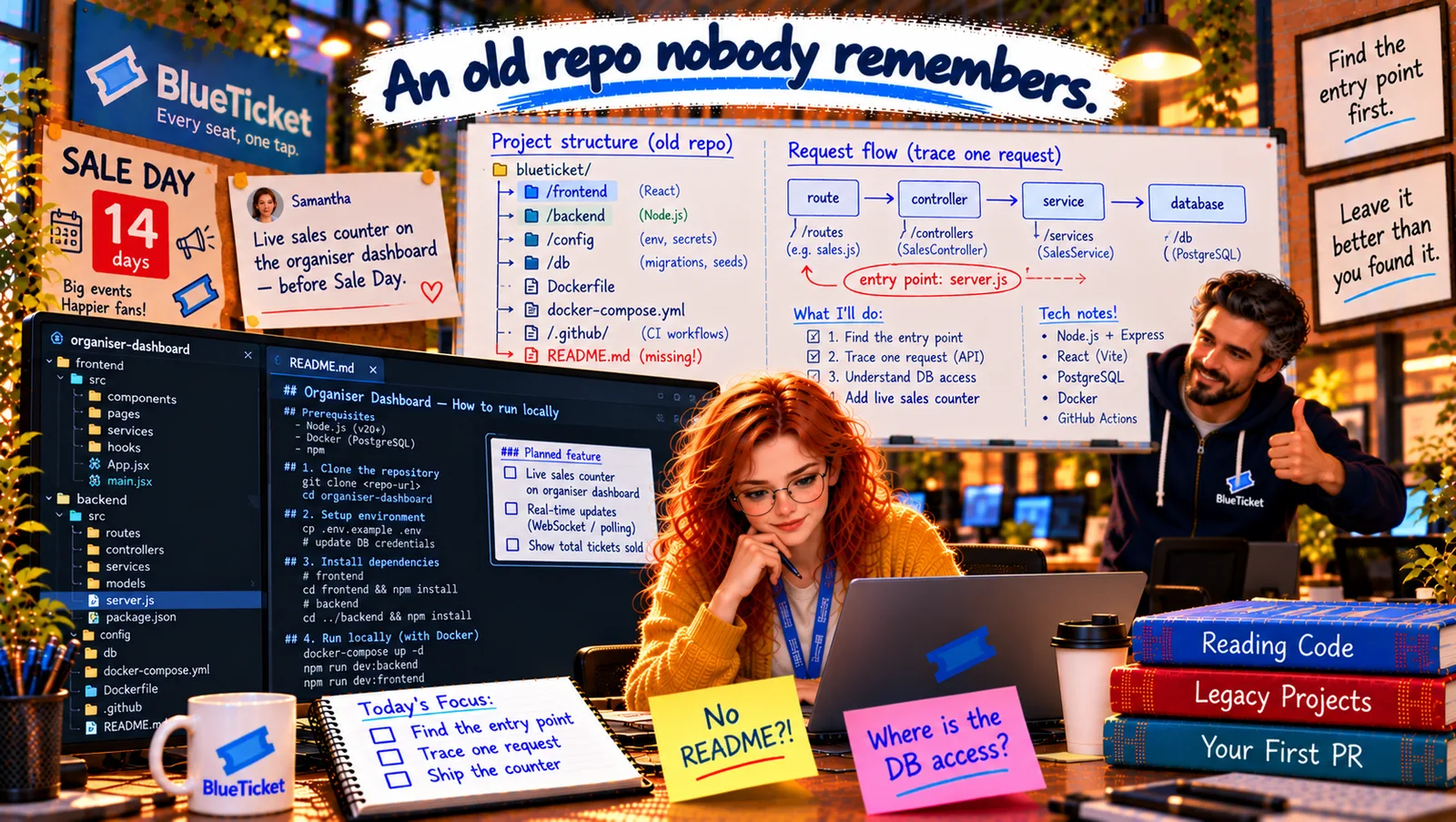
Month eleven. The countdown board says SALE DAY — 14 days. Samantha pins a card next to it: "Live sales counter on the organiser dashboard — before Sale Day." Organisers want to watch tickets being sold, live, on the big day.
The organiser dashboard lives in its own repository: organiser-dashboard. Nobody on the current team has ever opened it. It was written three years ago by Mark — the same Mark from the old README in Act 16 — who left long ago. Anna clones it and opens it in her editor. There's no README. Just folders.
John gives her one rule before she starts: "Don't try to read everything. Nobody can. Get a map first, then follow one path."
Find the entry point first.
John
Opening Random Files vs. Getting a Map First
No documentation
No README, no diagram, and the person who wrote it is gone.
Hundreds of files
Opening files one by one would take weeks — and most aren't relevant to the task.
A deadline
Fourteen days until Sale Day, and the change must be safe.
Repository Structure, Configuration, Environment Files and Dependencies
The unfamiliar house analogy: you're house-sitting in a house you've never seen. You don't start by opening every drawer. You walk through once: where's the front door, which room is which, where's the fuse box (settings), where do the water pipes come in (the database), and is there a note from the owners on the fridge (documentation)? Ten minutes later, you can find anything. A repository works the same way.
- Step back and look at the top level: run
tree -L 2(or look at the file explorer) to see only the first two levels of folders. Most projects follow familiar patterns (Act 16):frontend/orclient/(what runs in the browser),backend/orserver/orapi/(what runs on the server),config/,db/ormigrations/,tests/,scripts/,docs/, plus files at the root. - Frontend folder — the rooms visitors see: the code that runs in the browser (Act 12): pages, components, styles, images. In
organiser-dashboard,frontend/is a React app withsrc/pages/Dashboard.jsx— the organiser's main screen. - Backend folder — the kitchen and the plumbing: the server code: routes (the API's addresses), the logic and the database access. Here,
backend/is a Node.js Express app. - Configuration — the fuse box: settings that change between environments (Act 16, Act 19). Look for a
config/folder, files likeconfig.js,settings.py,appsettings.json, and anywhere the code reads environment variables. Here:config/default.jsonandconfig/production.json. - Environment files — the spare-key notes: look for
.env.example,.env.sampleor similar: they list the environment variables the app needs (Act 16). Real.envfiles should not be in the repo. Here, there's only an old.env.sample— and Anna already suspects it's out of date. - Dependencies — the shopping list tells you the stack:
package.json(orrequirements.txt,pom.xml— Act 16) is the quickest way to learn what a project is built with.backend/package.jsonlistsexpress(web framework),pg(PostgreSQL driver),jsonwebtoken(JWT auth, Act 22) andjest(tests).frontend/package.jsonlistsreactandvite. Itsscriptssection shows how to start, test and build it. And"engines": { "node": "16.x" }warns her about the version (Act 16). - Documentation — the note on the fridge: check for
README.md,docs/,CONTRIBUTING.md, comments at the top of key files, and the repository's wiki or issues. Here: nothing. - History — ask the house who lived here:
git log --oneline | headandgit shortlog -sn(Act 15) show how old the project is, who worked on it and what changed recently. The last commit was eight months ago: "temporary fix for sales export".
| Path | House version | What it tells Anna |
|---|---|---|
| frontend/ | Rooms visitors see | React app (Vite); Dashboard.jsx is the main page |
| backend/ | Kitchen and plumbing | Express API; server.js looks like the entry point |
| config/ | Fuse box | default.json, production.json |
| db/ | Water pipes | migrations/ (the schema) and seed.js (test data) |
| .env.sample | Note with spare keys | Variable names — possibly outdated |
| Dockerfile, docker-compose.yml | Moving instructions | Node 16; Postgres for local runs |
| .github/workflows/ | Building inspection plan | CI runs lint and tests |
| README.md | Note on the fridge | Missing |
| File | Language / stack |
|---|---|
| package.json | JavaScript / TypeScript (Node.js) |
| requirements.txt, pyproject.toml | Python |
| pom.xml, build.gradle | Java |
| composer.json | PHP |
| go.mod | Go |
| .csproj files | C# / .NET |
tree -L 2 -I node_modules # the top-level map, without node_modulescat backend/package.json # the stack, the scripts, the Node versiongit log --oneline | head -20 # recent historygit shortlog -sn # who wrote most of itls -a # hidden files: .env.sample, .github, .nvmrc?
Anna's first map, after 20 minutes: she writes it on the whiteboard: /frontend (React, Vite) · /backend (Express, entry point probably server.js) · /config (JSON settings) · /db (migrations and a seed script) · Dockerfile (Node 16) · docker-compose.yml · .github/workflows (CI) · .env.sample (old) · no README. Then a sticky note on her monitor: "No README?!" — and a promise to herself to fix that before she's done.
Key Takeaway
Get your bearings in an unfamiliar repo like walking through a new house: look at the top level first (tree -L 2), recognise the usual folders — frontend, backend, config, db, tests, scripts, docs — find the configuration and environment files (the fuse box), read the dependency files to learn the stack and the scripts to learn the commands, check for any documentation, and use git history to see how old it is and who worked on it. Then draw a map.
Why This Matters
Most of your career, you'll work on code you didn't write — joining a team, taking over a service, fixing a bug in an old system. The ability to get your bearings in an unfamiliar repository in the first hour is one of the most valuable practical skills a developer can have, and it's exactly what your first weeks at any job will test.
The map shows the rooms. Now Anna needs to find the systems inside the walls: where the database is used, where the API routes are, how logins are checked, what gets logged — and whether there are any tests to protect her.