

In this chapter
We'll learn what data really is, how it differs from information, and the two smallest units a computer uses — the bit and the byte — plus what KB, MB, GB and TB actually mean.
The Problem in Real Life
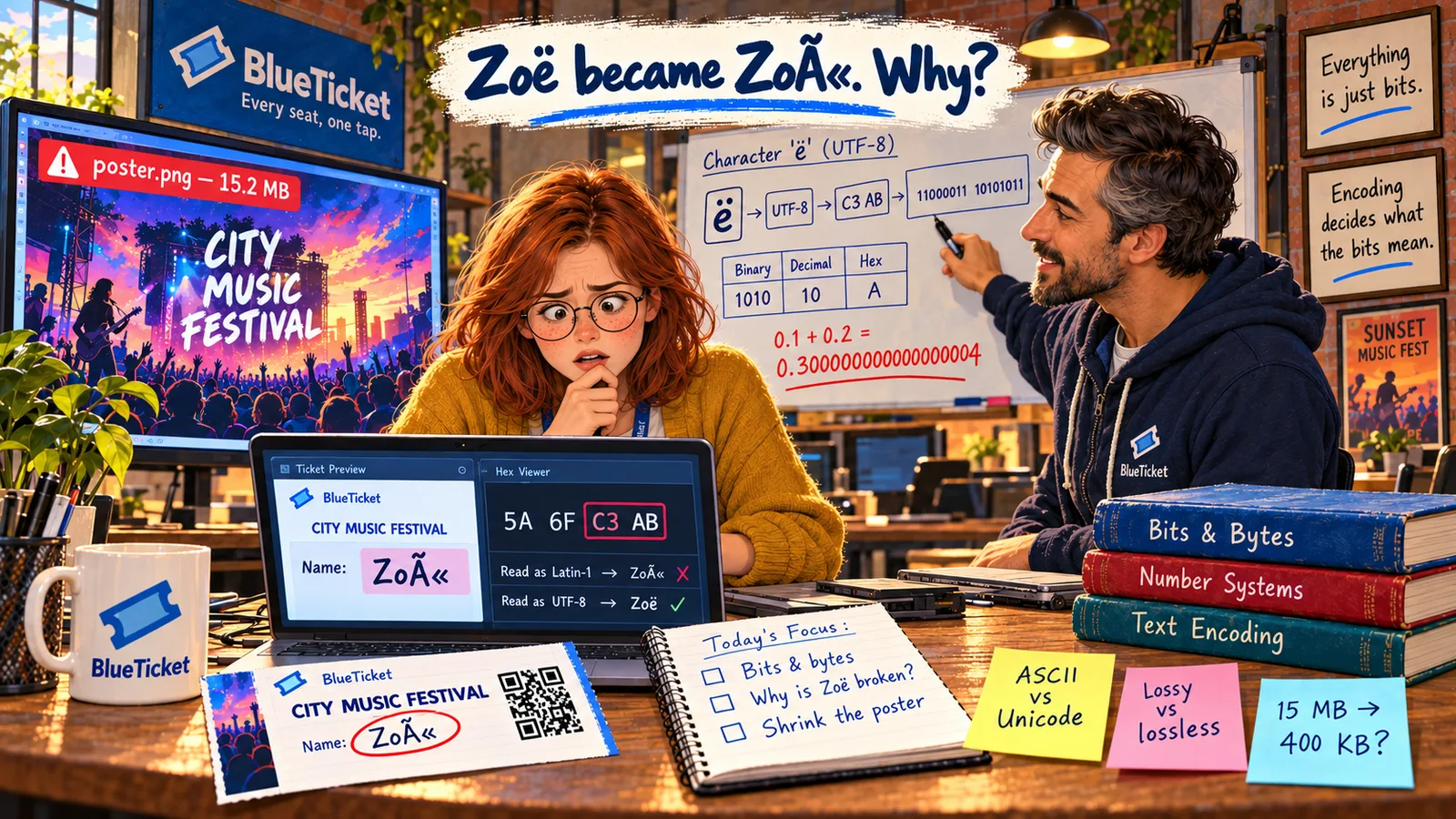
Week three. A support message lands in the team chat: a customer named Zoë Adams says her ticket shows her name as "Zoë". She's worried the gate scanner won't let her in.
An hour later, an organiser uploads a poster for the music festival. The event page now takes ages to load on phones. The poster file is 15.2 MB.
John sends both problems to Anna. "These look like two different bugs. They're actually the same topic: how computers store data. Let's start right at the bottom."
A name and a picture. How can those be the same kind of problem?
Anna
"A Name, a Price, a Picture" vs. What the Computer Stores
Everything looks different
Names, prices, photos and songs look like completely different things to us.
Inside, it's all the same
Inside the computer, every one of them is stored as long rows of 0s and 1s.
Size is just counting
KB, MB and GB are simply ways of counting how many of those 0s and 1s a file uses.
Data, Bits and Bytes
John starts with two words people mix up all the time: data and information.
Data is raw facts with no meaning on their own: "14", "C", "49.99", "Zoë". Information is data that has been put in context so it means something: "Zoë Adams has seat C14 for the City Music Festival, and paid 49.99." Computers store and move data; people (and software) turn it into information.
Now the most important idea in this whole Act: a computer can only store one kind of thing — on or off.
- Bit — short for binary digit. The smallest piece of data a computer can store. A bit is either 0 (off) or 1 (on). That's it — just two possible values.
- Byte — a group of 8 bits, like
01001010. One byte has 2 × 2 × 2 × 2 × 2 × 2 × 2 × 2 = 256 possible patterns, enough for one letter, one small number, or one colour level. The byte is the basic unit for measuring size. - Kilobyte (KB) — about one thousand bytes. A short text email.
- Megabyte (MB) — about one million bytes. A photo from a phone, or a song.
- Gigabyte (GB) — about one billion bytes. A two-hour film in good quality.
- Terabyte (TB) — about one trillion bytes. Hundreds of films, or a whole company's files.
| Data (raw facts) | Information (data with meaning) |
|---|---|
| C14 | Seat C14 at the City Music Festival |
| 49.99 | The ticket cost 49.99 |
| 2026-11-14 | The show is on 14 November 2026 |
| Zoë Adams | The ticket belongs to Zoë Adams |
| Unit | About how many bytes | Real example |
|---|---|---|
| 1 byte | 1 | One letter, like "Z" |
| 1 KB | 1,000 | A short email |
| 1 MB | 1,000,000 | A phone photo, an MP3 song |
| 1 GB | 1,000,000,000 | A film |
| 1 TB | 1,000,000,000,000 | A large laptop drive |
Each step up is about a thousand times bigger than the one before.
One small trap: computers count in powers of 2, so in some places 1 KB means 1,024 bytes, not 1,000. To avoid confusion there are separate names — KiB, MiB, GiB (kibibyte and so on) — for the 1,024 versions. This is why a "512 GB" drive shows as about 476 GB in Windows: the drive maker counts in thousands, Windows counts in 1,024s. Nothing is missing; they're just counting differently.
Also watch out for bits vs. bytes. Internet speeds are measured in bits per second (Mbps, with a small "b"), while file sizes are in bytes (MB, with a capital "B"). A 100 Mbps connection downloads about 12.5 MB per second, because there are 8 bits in a byte.
So what's the link between Zoë's name and the poster? Both are just bytes. Her name is a few bytes that were read the wrong way. The poster is fifteen million bytes — far more than a phone should download for one picture. Fix the way we read bytes, and fix how many bytes we send, and both bugs go away. The next chapters show how.
Key Takeaway
Everything a computer stores — text, numbers, images, sound — is made of bits, each one just 0 or 1. Eight bits make a byte, and every file size (KB, MB, GB, TB) is simply a count of bytes.
Why This Matters
Sizes and units come up every single day in IT: how big a database is, how much RAM a server has, how fast the internet connection is, how long a file takes to upload. When BlueTicket plans for 50,000 fans, the first question will be "how many bytes does each fan need us to send?" — and that's a sum you can only do if you understand bytes.
Anna knows that everything is bits. But looking at a row of 0s and 1s still means nothing to her. Next, John shows her how to actually read them — by counting the way a computer counts.