

In this chapter
We'll learn how letters become numbers — ASCII, Unicode and UTF-8 — what a text encoding is, and use it to solve exactly why Zoë became Zoë.
The Problem in Real Life
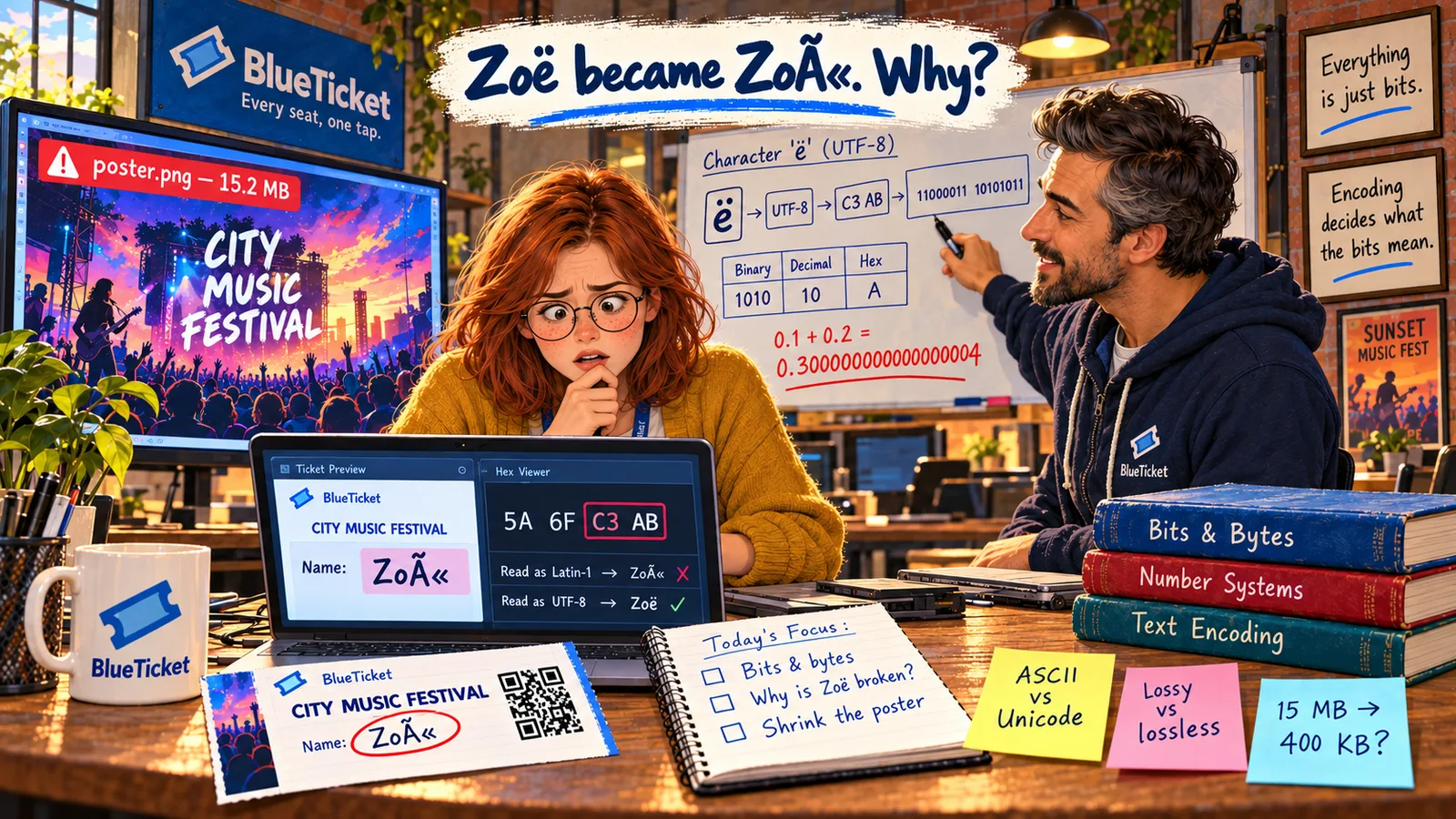
Back to the hex viewer. Zoë's name is stored as four bytes: 5A 6F C3 AB. On the website, her name looks perfect. On the printed ticket, it says Zoë.
Anna notices something: the bytes are the same in both places. "So the data isn't broken," she says slowly. "The website and the ticket printer are just... reading it differently?" John grins. "Now you're thinking like an engineer."
| Byte (hex) | 5A | 6F | C3 | AB |
|---|---|---|---|---|
| Read as UTF-8 | Z | o | ë (uses both bytes) | |
| Read as Latin-1 | Z | o | Ã | « |
The bytes never change. Only the rule used to read them does.
Same four bytes. Two different names. How?
Anna
"The Text" vs. Bytes Plus a Rule for Reading Them
The data wasn't damaged
Zoë's bytes are correct. The ticket printer used the wrong rule to turn them back into letters.
The world has many alphabets
English letters fit in a tiny table. Every other language — and emoji — needs much more.
Both sides must agree
Whoever writes text and whoever reads it must use the same encoding, or the text breaks.
How Computers Store Text
Computers only store numbers. So to store text, we need an agreed list that says "this number means this letter." That list is called a character set, and the rule for turning characters into bytes is called a text encoding.
- ASCII (1960s) — the first widely used character set. It gives a number to 128 characters: English letters, digits, punctuation and a few control codes. A = 65, a = 97, 0 = 48, a space is 32. Each character fits in one byte. But ASCII has no é, no ñ, no Chinese, no Arabic, no emoji.
- Extended sets like Latin-1 — later, many different 256-character sets were made for different regions, using the extra values from 128 to 255. The problem: the same number meant a different letter in each set. Byte
C3is "Ã" in Latin-1 but something else in a Russian or Greek set. - Unicode — one giant list that gives every character in every language its own unique number, called a code point. Today it covers well over 100,000 characters, including emoji. Code points are written like
U+00EB(that's ë) orU+1F600(😀). - UTF-8 — the most common way to turn Unicode code points into bytes. It uses 1 byte for plain English letters (so ASCII text is valid UTF-8 unchanged), 2 bytes for letters like ë, ñ and ü, 3 bytes for most Asian scripts, and 4 bytes for emoji. Almost the entire web uses UTF-8.
| Character | Unicode code point | UTF-8 bytes (hex) | Bytes used |
|---|---|---|---|
| Z | U+005A | 5A | 1 |
| o | U+006F | 6F | 1 |
| ë | U+00EB | C3 AB | 2 |
| € | U+20AC | E2 82 AC | 3 |
| 😀 | U+1F600 | F0 9F 98 80 | 4 |
English letters use 1 byte, just like ASCII. Other characters use 2 to 4.
| What you see | Likely cause |
|---|---|
| é or ë in names | UTF-8 text read as Latin-1 / Windows-1252 |
| � (a question mark in a diamond) | Bytes that aren't valid in the chosen encoding |
| ????? instead of letters | Text saved in an encoding that can't hold those letters |
| Emoji turn into empty boxes | The font has no picture for that character |
Now Anna can solve the mystery. When Zoë signed up, the website saved her name in UTF-8: Z = 5A, o = 6F, and ë = the two bytes C3 AB. The website reads it back as UTF-8, so it looks right.
The ticket printer service, though, was set up years ago to read text as Latin-1, where every byte is one character. So it read C3 as à and AB as «. Two bytes meant for one letter became two wrong letters. That's Zoë. This kind of garbled text even has a name: mojibake (from Japanese, roughly "character transformation").
The fix is not to change Zoë's name — the data is fine. The fix is to make the ticket service read text as UTF-8, like everything else. John shares the golden rule: use UTF-8 everywhere — in the database, in files, in emails, in APIs — and always state the encoding when sending text, for example Content-Type: text/html; charset=utf-8.
Anna changes one line in the ticket service's settings. The reprinted ticket says Zoë Adams. She sends the support team a message to tell the customer her ticket is fixed.
Key Takeaway
Text is stored as numbers using an encoding. Unicode gives every character in every language a unique number, and UTF-8 turns those numbers into bytes. Garbled text like "Zoë" almost always means the bytes are fine but were read with the wrong encoding — so use UTF-8 everywhere.
Why This Matters
BlueTicket sells tickets to fans with names from every country. A wrong encoding doesn't just look ugly — it can break name checks at the gate, search, sorting and email delivery. Encoding bugs appear anywhere text moves between two systems: databases, files, APIs and emails. Knowing to check "which encoding did each side use?" turns a scary bug into a five-minute fix.
One bug down. The second one is still there: a 15.2 MB poster that makes the event page crawl. To fix it, Anna needs to know how pictures — and sound and video — are stored as bytes.