

In this chapter
We'll learn the three places software lives — development, staging and production — and why each one exists, explained as a theatre play's home rehearsal, dress rehearsal and opening night, starting with Anna's very first deploy going wrong.
The Problem in Real Life
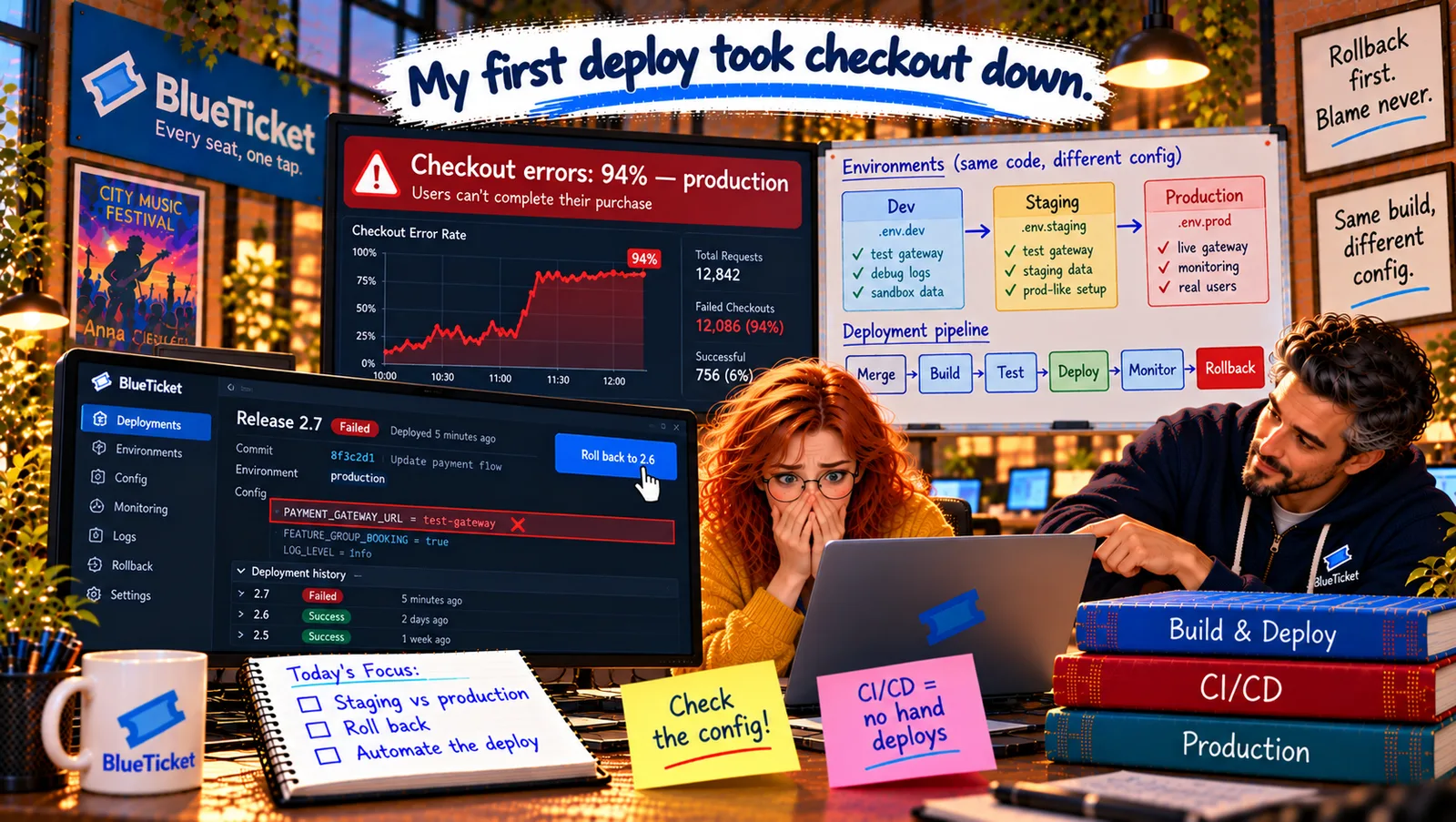
Month nine. For the first time, Anna is allowed to deploy a release herself: v2.7.0. One of its changes is hers — the payment gateway's address used to be written inside the code, and she moved it into a setting called PAYMENT_GATEWAY_URL (exactly what Act 16 taught). She follows the old deploy notes, copies the settings across, and presses deploy at 4:10 PM.
At 4:12 PM, the big screen on the wall turns red: Checkout errors: 94% — production. Fans are trying to pay, and almost every payment fails. Anna goes white. John is already at his keyboard. He clicks "Roll back to v2.6.0". By 4:14 PM, the graph drops back to normal.
Only then does he turn around. "Everyone OK? Good. Nobody's in trouble. We'll find out what happened, not who. But first, let's understand the three places our code lives — because the bug lives in the gap between two of them."
Rollback first. Blame never.
John
One Place for Everything vs. Rehearsal, Dress Rehearsal and Opening Night
Mistakes reach real users
If you test changes where real customers are, every mistake costs real money.
Laptops aren't the real world
Your laptop has a small database, test keys and one user. Production has thousands.
Each place needs different settings
The same code must talk to a test payment gateway in one place and the real one in another.
Development, Staging and Production
The theatre analogy: a theatre company doesn't try new scenes in front of a paying audience. Actors first rehearse at home or in a small room — mistakes are free. Then there's a dress rehearsal on the real stage, with real costumes and lights but no audience — the last chance to catch problems. Then comes opening night, with the real audience. Software has the same three places, called environments.
- Development (dev) — rehearsing at home: the developer's own laptop (Act 16), or a shared dev server. A small local database with fake data, test keys, debug logging on. Breaking things here is normal and harmless.
- Staging — the dress rehearsal: a private copy of the real system, set up as close to production as possible: same kind of servers, same build, a copy of realistic data (with personal details removed). Only the team can reach it, at an address like
staging.blueticket.example. It still uses test payment keys, so no real money moves. This is where the team checks a release, and where Samantha tries new features (Act 18's Definition of Done). - Production (prod) — opening night: the real system that real fans use, at
blueticket.example. Real data, real money, the live payment gateway. Every mistake here affects real people, so changes arrive here only after passing through the other two. - Same code, different settings: all three run the same code but with different configuration (Act 16): a different database, different keys, different payment gateway. Keeping those settings right for each environment is one of the most important jobs in deployment.
| Environment | Theatre version | Who uses it | Data | Payment gateway |
|---|---|---|---|---|
| Development | Rehearsing at home | One developer | Small, fake | Test |
| Staging | Dress rehearsal | The team, Samantha | Realistic, anonymised copy | Test |
| Production | Opening night | Real fans | Real | Live |
| Time | What happened |
|---|---|
| 4:10 PM | v2.7.0 deployed by hand, with PAYMENT_GATEWAY_URL copied from staging |
| 4:12 PM | Alert: checkout errors 94% in production |
| 4:12 PM | John clicks "Roll back to v2.6.0" |
| 4:14 PM | Errors back to normal (v2.6.0 has the address inside its code) |
| 4:30 PM | Calm review: what happened, and how to make it impossible |
Three environments, one code base
Development
laptop · fake data · TEST keys
Staging
staging.blueticket.example · TEST gateway
Production
blueticket.example · LIVE gateway
Same code, different settings in each
the 4:10 PM bug: staging's value copied into production
What went wrong at 4:10 PM: PAYMENT_GATEWAY_URL was a brand-new setting. Production had never had it. The deploy notes said, "copy any new settings across." Anna opened the staging settings, copied the value, and pasted it into production. Staging's value was, correctly for staging, the test gateway: https://test-gateway.payments.example. So production started sending real fans' real cards to a test gateway, which rejected them. 94% of payments failed. (The other 6% were fans using saved wallet payments, which take a different path.)
Not Anna's fault — the process's fault: a person copying values by hand between environments, under time pressure, will eventually copy the wrong one. That's not a person problem; it's a process problem. The rest of this Act is about making this mistake impossible: settings stored separately for each environment, the same tested build everywhere, a start-up check, and a pipeline instead of hands.
Key Takeaway
Software lives in three environments, like a play: development (rehearsing at home — mistakes are free), staging (the dress rehearsal — a private, production-like copy with test keys) and production (opening night — real users, real money). They all run the same code with different configuration, and copying settings between them by hand is how a test value ends up in production.
Why This Matters
Every company separates environments this way, and you'll hear "is this on staging?" and "don't test that in prod!" every week. Understanding what each environment is for, and that their settings differ, is the foundation for safe releases — and explains a huge share of "it worked on staging" incidents.
"Same code, different settings" sounds simple. So why did it go wrong? John wants Anna to understand what exactly gets shipped to each environment — and where the settings should come from instead of someone's clipboard.