

In this chapter
We'll learn why serious software keeps its data in a database instead of plain files — with a shared notebook and a bank as our pictures — and what a database and a DBMS actually are.
The Problem in Real Life
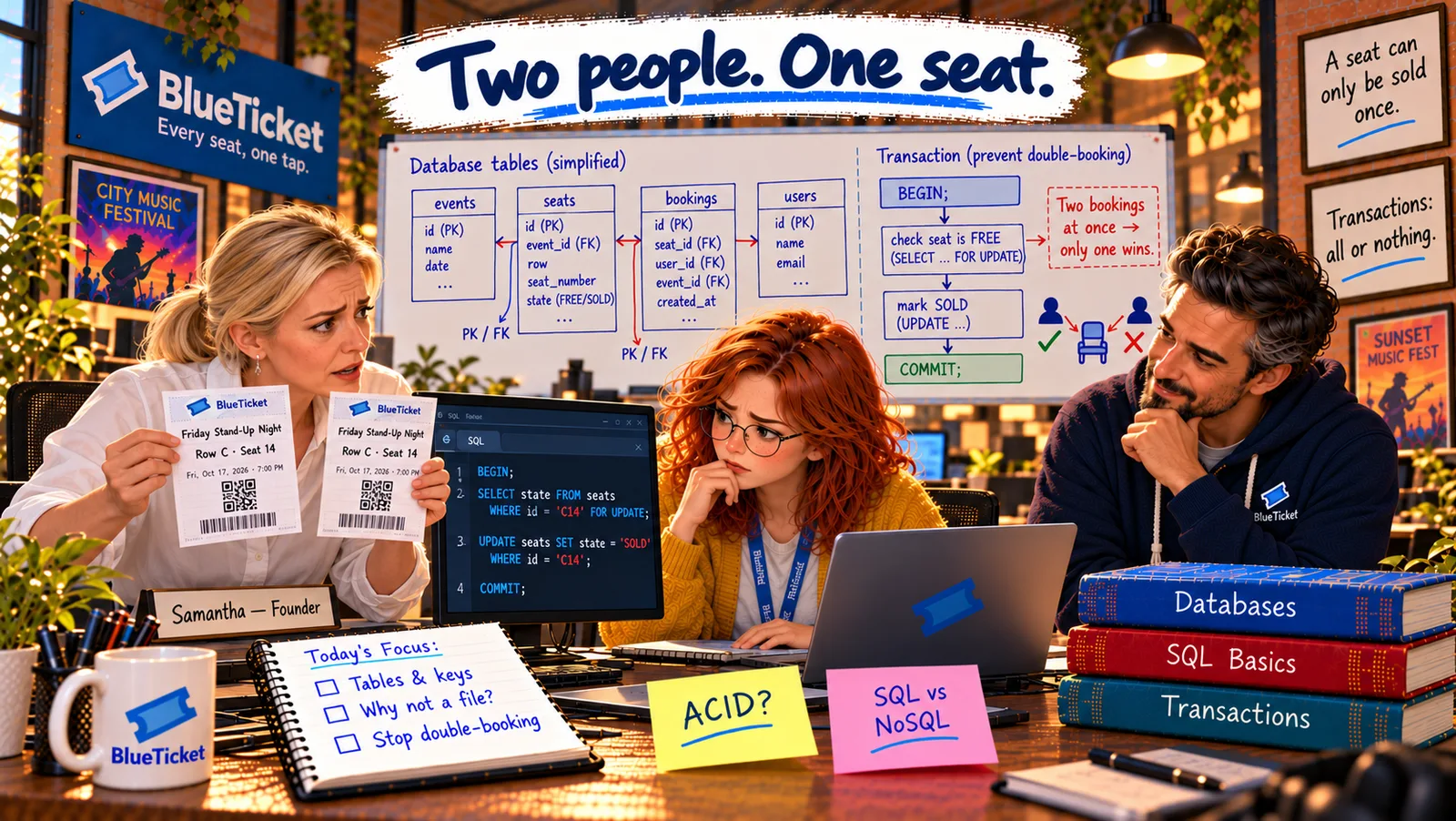
Week thirteen, Friday night. The Friday Stand-Up Night is sold out. At 8:05 PM, Samantha's phone rings: two people are standing at Row C, Seat 14, both holding valid tickets. One bought hers online at 6:02 PM. The other bought his at the venue's box-office kiosk — at 6:02 PM.
On Monday morning, Anna and John dig in. The online checkout keeps bookings in BlueTicket's database. But the old box-office kiosk, written years ago as a quick experiment, still checks and saves its sales in a file on the venue's computer, and only copies them to the database every few minutes.
"So at 6:02, both systems looked, both saw C14 as free, and both sold it," Anna says. John nods. "That's what happens when two things keep their own copy of the truth. Databases exist to stop exactly this."
Data you can't trust is worse than no data at all.
John
"Just Save It in a File" vs. Keeping Data You Can Trust
Two copies of the truth
When two systems keep their own records, they eventually disagree — and sell the same seat twice.
Many people at once
Thousands of fans read and change the same data at the same moment. A plain file can't handle that safely.
Data must survive
Crashes, power cuts and bugs must never lose or corrupt a booking someone paid for.
Why Databases Exist
The shared notebook analogy: imagine a small shop that keeps every sale in one paper notebook on the counter. With one shopkeeper, it works. Now imagine ten shopkeepers, all writing in the same notebook at the same time, some tearing out pages, one spilling coffee on it, and the owner trying to find "all sales to Zoë last March." It falls apart. A plain file on a computer has exactly the same problems.
The bank analogy: now picture a bank. You don't walk into the vault and count the money yourself. You ask a teller, who follows strict rules: checks who you are, makes sure two people can't withdraw the same money at once, records every change, and keeps everything safe even if the lights go out. A database works like the bank's vault and its records together, and the DBMS is the teller.
- Database: an organised collection of data, stored so it can be found, changed and kept safe — all of BlueTicket's events, seats, fans and bookings.
- DBMS (Database Management System): the software that manages the database for you, like the bank's tellers and rules. Programs never touch the data files directly; they ask the DBMS. Examples: PostgreSQL, MySQL, SQL Server and Oracle (relational), MongoDB and Redis (non-relational, chapter 5). People usually say "the database" for both.
| Feature | Plain file (shared notebook) | Database (bank) |
|---|---|---|
| Many people writing at once | They overwrite each other | Handled safely |
| Rules (no negative prices, real seats only) | You must check everything yourself | Enforced by the DBMS |
| Finding one record among millions | Read the whole file | Milliseconds, with indexes |
| Power cut in the middle of saving | File may be corrupted | Change is either fully saved or not at all |
| Who may see what | Whoever can open the file | Fine-grained permissions |
| Time | Online checkout (database) | Box-office kiosk (file) |
|---|---|---|
| 6:02:10 | Checks C14: FREE | Checks C14 in its file: FREE |
| 6:02:12 | Sells C14 to the online fan | Sells C14 to the walk-in fan |
| 6:05:00 | — | Copies its sales to the database: too late |
| 8:05 PM | Two fans, one seat | Two fans, one seat |
What a DBMS gives you that a file doesn't: a file is just bytes; you have to write every rule yourself. A DBMS gives you, ready-made:
Many users at once: thousands of programs can read and write at the same time without overwriting each other's work. Rules that are always enforced: "every booking must point to a real seat," "a price can't be negative" — the database refuses data that breaks them. Fast searching: find "every booking for event 42" among millions in milliseconds (chapter 4). Safety: changes are all-or-nothing, and survive crashes and power cuts. Security: who may read or change what. Backups and recovery: a way back if something goes wrong.
The real problem at the venue: it wasn't that the kiosk was slow or badly written. It was that BlueTicket had two sources of truth — the database and the kiosk's file — that only synced every few minutes. For three minutes, each thought C14 was free. The lesson: important data should live in one place that everyone asks, and that place should be a database built for many people at once.
Anna writes the plan for the week on the whiteboard: move the kiosk onto the database, understand how BlueTicket's data is organised, and make sure two sales of the same seat become impossible — not just unlikely. The rest of this Act follows that plan.
Key Takeaway
A database is an organised collection of data, and a DBMS is the software that manages it — like a bank's vault and its tellers. Unlike a plain file, a DBMS lets many users work at once safely, enforces rules, searches fast, survives crashes and controls access. Important data should have one source of truth that everyone asks.
Why This Matters
Almost every application you'll ever work on has a database at its heart, and most of the data bugs you'll meet come from forgetting what it's there for: one source of truth, rules that are always enforced, safe changes. If you want to go deep after this Act, BizTechLab's Relational Databases course teaches all of it from first principles.
The plan is to put the kiosk onto BlueTicket's database. But Anna has never really looked inside it. How is all that data actually organised?