

In this chapter
We'll learn what a variable really is, how assignment with = stores a value, what happens when you give a variable a new value or copy it into another one, why a PHP variable can hold any type — and why a single misspelled name gave Olivia a blank instead of a booking count.
The Problem in Real Life
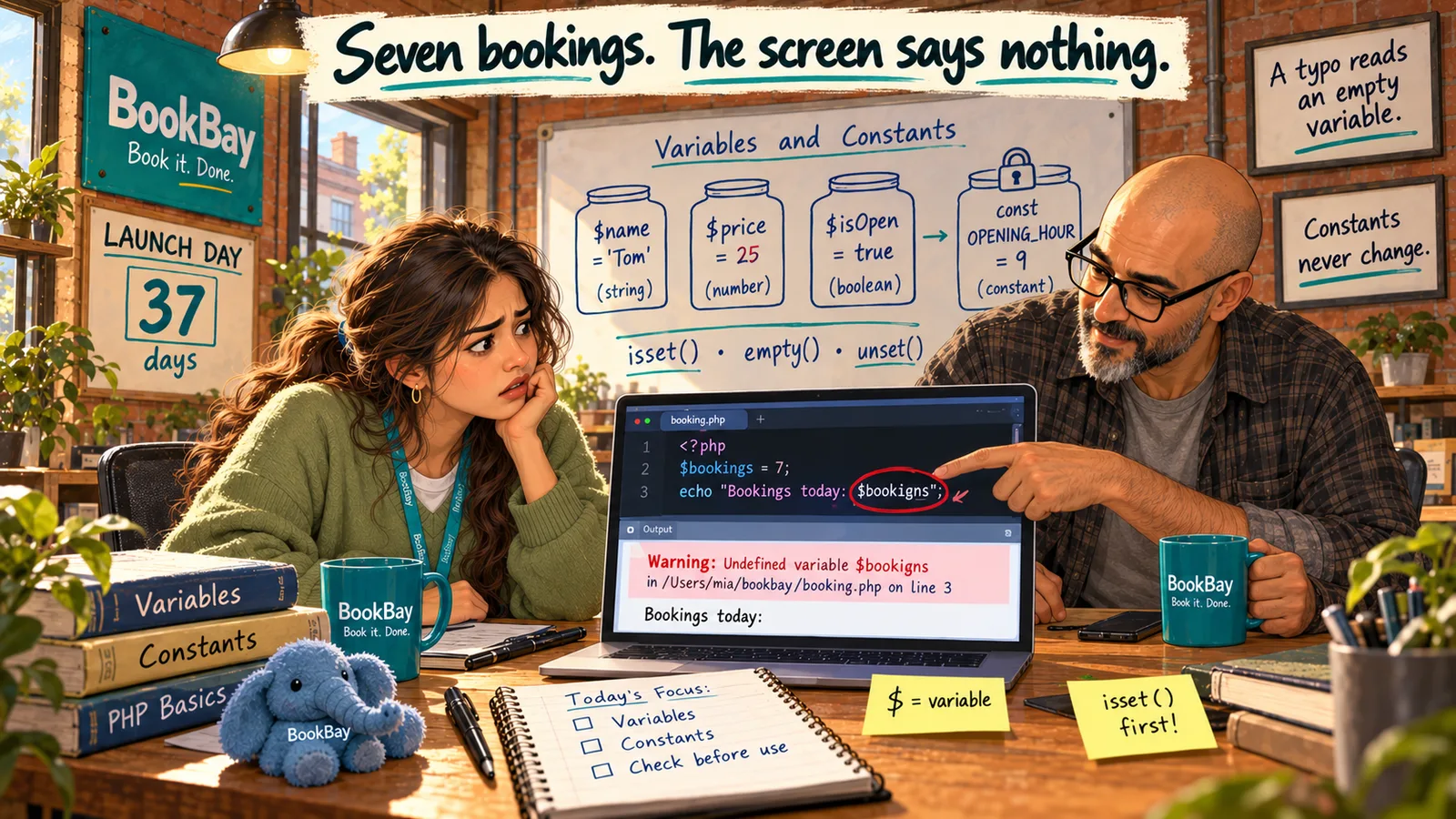
Monday morning. Olivia opens the little report page Mia built last week. It should say how many bookings Tom has today. It says: Bookings today: — and then nothing. Tom's phone shows seven.
Mia opens the file on her laptop and runs it. This time PHP shows a warning above the output: Warning: Undefined variable $bookigns. She looks at the line. She had typed $bookigns instead of $bookings. On the live server, warnings are hidden, so Olivia only ever saw the blank.
"PHP didn't stop you," says Marcus. "It met a name it had never seen, gave it no value, wrote a warning and carried on. To stop that happening, you need to know exactly what a variable is."
I spelled one word wrong, and PHP just carried on with an empty value?
Mia
The Value You Meant vs. the Value PHP Used
A silent blank
A misspelled variable doesn't stop PHP. It warns, uses an empty value and keeps going.
What is a variable, really?
Names, values, the $ sign and the = sign — the basics every later Act is built on.
Values that change
A variable's value can be replaced at any time — and even become a different kind of value.
Variables and Assignment
What a variable is: a variable is a name that holds a value, so you can use that value later just by writing the name. Think of a box with a label on it: the label is the name ($bookings) and what's inside is the value (7). Whenever PHP meets $bookings in your code, it looks inside the box and uses what it finds. Programs use variables for everything that can be different from one run to the next: today's bookings, a customer's name, a price.
In PHP, every variable follows three simple rules:
- It starts with a dollar sign:
$bookings,$shopName,$price. The$tells PHP "this is a variable" (you saw this in Act 02, chapter 4). - It's created by giving it a value: some languages make you announce a variable first, which is called declaring it. PHP doesn't. The first time you write
$bookings = 7;, the variable exists. - It can hold any kind of value: a whole number, text, a number with a decimal point, true or false — and later a list (an array) or an object.
Assignment: putting a value into a variable is called assignment, and it uses the = sign. Read = as "becomes", not "equals": $bookings = 7; means "$bookings becomes 7". PHP always works out the right side first, then stores the result in the variable on the left. That's why the right side can be any expression (Act 02, chapter 2), like $bookings * $haircutPrice. The diagram and the code below show it.
What PHP does with one assignment
$takings = $bookings * $haircutPrice;
one assignment
1. Work out the right side
7 times 25 = 175
2. Store the result on the left
$takings now holds 175
<?php$shopName = "Tom's Barbershop"; // text$bookings = 7; // a whole number$haircutPrice = 25;$takings = $bookings * $haircutPrice; // the right side is worked out first: 175echo "$shopName: $bookings bookings, £$takings\n";
Output: Tom's Barbershop: 7 bookings, £175
Reassignment: a variable holds one value at a time. Assigning a new value replaces the old one — the old value is simply gone. Because PHP runs a file from top to bottom, at any line a variable holds whatever was assigned to it last. One pattern you'll write all the time uses the variable's own value on the right side: $bookings = $bookings + 1; means "take the current value, add 1, and store the result back". Act 05 shows a shorter way to write it.
<?php$bookings = 7;echo $bookings, "\n"; // 7$bookings = 8; // replaces 7echo $bookings, "\n"; // 8$bookings = $bookings + 1; // 8 + 1, stored backecho $bookings, "\n"; // 9
Assignment copies the value: when you write $b = $a;, PHP copies the value of $a into $b. From then on they're two separate boxes. Changing $a later does not change $b, as the code below shows. (There's a way to make two names share one value, called a reference. That's chapter 4.)
<?php$todayPrice = 25;$yesterdayPrice = $todayPrice; // copies 25$todayPrice = 30; // only $todayPrice changesecho "Today: $todayPrice, yesterday: $yesterdayPrice";
Output: Today: 30, yesterday: 25
Dynamic typing: the type of a value is what kind of value it is: a whole number, text, a decimal number, true or false, and so on. In PHP, a variable itself has no fixed type. The type belongs to the value inside it, and you can put a different kind of value into the same variable at any time. This is called dynamic typing. Below, var_dump() (Act 02, chapter 7) shows one variable holding four different types, one after another. PHP allows it — but don't do it on purpose. A $price that is sometimes a number and sometimes text is a bug waiting to happen, so keep one kind of value per variable. (The strict-types line from Act 02 checks values going into and out of functions; it doesn't stop this. Act 04 covers types in depth.)
<?php$price = 25;var_dump($price); // int(25)$price = "25 pounds";var_dump($price); // string(9) "25 pounds"$price = 25.5;var_dump($price); // float(25.5)$price = true;var_dump($price); // bool(true)
PHP allows this. Good code doesn't do it — keep one kind of value per variable.
Naming variables: the rules and conventions from Act 02, chapter 4 apply: letters, digits and _, never a digit first, camelCase, and a name that says what the value is — $bookingsToday, not $b. Names are case-sensitive, so $bookings and $Bookings are two different variables (Act 02, chapter 3). And one name is taken: $this belongs to PHP (you'll use it in Act 11). Try to assign to it, and PHP stops with Fatal error: Cannot re-assign $this.
Using a variable that doesn't exist: now Mia's bug. If you read a variable that was never given a value — because of a typo, or because you forgot to set it — PHP does not stop. It shows a warning, uses null in its place (null is PHP's value for "nothing here"), and carries on. When null is printed it becomes empty text, so the page showed Bookings today: and nothing after it. Here's the bug, made small.
<?php$bookings = 7;echo "Bookings today: $bookigns";
Warning: Undefined variable $bookigns in main.php on line 4Bookings today:
A warning, then the output with an empty value. The file didn't stop. Fix the spelling and it prints Bookings today: 7.
Why nobody saw the warning: a warning is PHP saying "this looks wrong, but I'll keep going". A fatal error is different: PHP stops the file right there. The table below compares the kinds of messages you've met so far. On Mia's laptop, display_errors is On, so warnings appear on the screen. On the live server it's Off (Act 01, chapter 5), so the warning went only into the error log — and Olivia saw a blank. That's why developers read the error log, and why tools like PHPStan (Act 21) can catch a misspelled variable before the code ever runs.
| Kind | What PHP does | Example |
|---|---|---|
| Parse error | Nothing runs at all — PHP can't read the file | A missing semicolon (Act 02) |
| Fatal error | Runs until the problem, then stops the file | Cannot re-assign $this |
| Warning | Shows a message and carries on | Undefined variable $bookigns |
| Deprecated | Works for now, but will change in a future PHP | A float quietly cut to an int (Act 02) |
An even quieter typo: a misspelled name on the left of = is worse. Writing to a variable creates it, so $bookigns = $bookings + 1; gives no warning at all: PHP creates a brand-new variable $bookigns holding 8, and $bookings stays at 7. No message, just a wrong number. Three habits protect you: give every variable its starting value near the top of the file, choose clear names that are hard to mistype, and let your editor's autocomplete type names for you.
<?php$bookings = 7;$bookigns = $bookings + 1; // creates a NEW variable, holding 8echo "Bookings today: $bookings"; // Bookings today: 7
No message of any kind — the count is simply wrong.
How long a variable lives: a variable exists only while the PHP file is running. When the file finishes — at the end of every page load, or every php command in the terminal — all its variables are gone, and the next run starts with nothing. So $bookings can't remember yesterday's count, or even the previous page load. Anything that must be kept goes into a file or a database (Acts 15 and 18), or a session (Act 17).
Key Takeaway
A variable is a $name that holds a value. It's created by assigning to it with =, which stores the result of the right side; a new assignment replaces the old value, and $b = $a copies the value. The type belongs to the value, not the variable. Reading a variable that was never set doesn't stop PHP — it warns and uses null — so one typo can quietly print a blank.
Why This Matters
Variables are in every line of PHP Mia will ever write. Knowing that = stores the result of the right side, that assignment copies, and that the last assignment wins lets her predict what any line will do — instead of running it and hoping.
And the typo lesson is a real one: a misspelled variable is one of the most common bugs in PHP, and on a live site it hides behind a blank. BookBay will catch these with starting values, clear names, the error log, and later PHPStan.
Mia fixes the spelling and the report shows 7 again. Then Olivia asks for one more thing: customers should be able to leave a note for the barber when they book — but most won't. "So sometimes $note exists and sometimes it doesn't," says Mia. "How do I check before I use it?" That's the next chapter.