

In this chapter
We'll learn why two requests writing the same file at the same moment lose data — a race condition — how flock() makes them take turns, why the lock must come before the read, how writing to a temporary file and renaming it makes a write atomic, how to combine both safely, and why all this still doesn't turn a file into a database.
The Problem in Real Life
Saturday, 09:00:01. Tom Hart and Ann Lee both book the 10:00 slot on Friday within the same second. Both see "Booked!". At 9:55 on Friday, Tom arrives — and bookings.json only contains Ann's booking. Nobody deleted anything; the file simply never had Tom's.
Marcus reproduces it on his laptop by starting two bookings at once from the terminal. Both scripts print "saved". The file contains one booking.
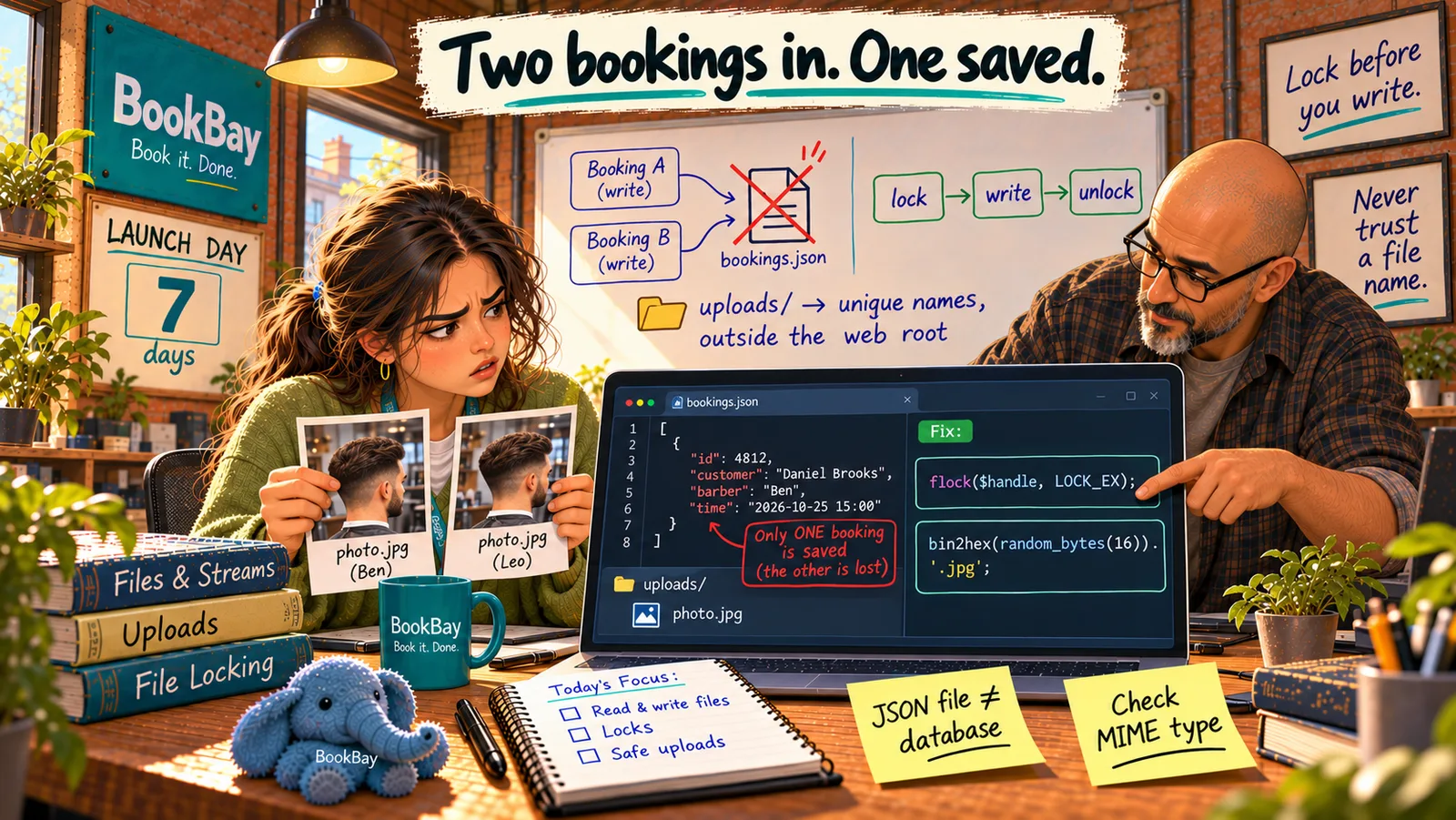
Each request read the file, added its booking, and wrote the file back. The second write erased the first.
Marcus
Everyone Writes at Once vs. Lock, Write, Unlock
A race condition
Two requests read the same old data, and the last one to write wins.
Take turns
flock() makes the second request wait until the first one has finished.
All or nothing
Write a temporary file, then rename it: readers never see half a file.
Locking, Atomic Writes and Temporary Files
Many requests, one file: a web server handles many requests at the same time. As soon as two of them change the same file, the order of their steps matters. This chapter covers:
- Race conditions: how a booking disappears.
- flock(): shared and exclusive locks, and waiting.
- Lock before you read: the read-change-write pattern.
- Atomic writes: a temporary file plus rename().
- Temporary files: and the limits of files.
Race conditions: BookBay's booking page does three steps: read bookings.json, add the new booking to the array, write the file back. When Tom's and Ann's requests run at the same moment, both read the file before either writes. Each adds its own booking to its own copy of the old list, and each writes its copy back — Ann's write, coming second, replaces Tom's. This is a race condition: the result depends on the timing of things running in parallel. It never shows up when you test alone, and it's guaranteed on a busy Saturday. The diagram below shows the timeline, and the example reproduces it with two real processes.
How Tom's booking disappeared
Tom's request
reads [ ] (empty)
Ann's request
reads [ ] (empty)
adds Tom → [Tom]
in its own memory
adds Ann → [Ann]
in its own memory
writes [Tom]
the file is [Tom]
writes [Ann]
the file is [Ann]: Tom is gone
With flock(): Ann's request waits
then reads [Tom] and writes [Tom, Ann]
<?php// race.php — read, change, write, with no lock$file = __DIR__ . '/bookings.json';$bookings = json_decode(file_get_contents($file), true);$bookings[] = ['customer' => $argv[1], 'slot' => '2026-11-06 10:00'];usleep(300_000); // the time a real request might takefile_put_contents($file, json_encode($bookings));echo "saved {$argv[1]}\n";// $ echo '[]' > bookings.json// $ php race.php "Tom Hart" & php race.php "Ann Lee" & wait// saved Tom Hart// saved Ann Lee// $ cat bookings.json// [{"customer":"Ann Lee","slot":"2026-11-06 10:00"}]
flock(): flock($handle, LOCK_EX) takes an exclusive lock on an open file: if another process holds a lock on it, this call waits until it's released. LOCK_SH takes a shared lock — several readers can hold one at once, but no writer can get LOCK_EX meanwhile. LOCK_UN releases the lock, and so do fclose() and the end of the script. Adding LOCK_NB ("non-blocking") makes flock() return false immediately instead of waiting. PHP's locks are advisory: they only stop other code that also calls flock(). A script that writes without locking walks straight through — so every piece of code that touches the file must use the same lock.
<?php$handle = fopen(__DIR__ . '/report.lock', 'c');if (!flock($handle, LOCK_EX | LOCK_NB)) {echo "The nightly report is already running — skipping.\n";exit(0);}echo "Building the report...\n";sleep(5); // start a second copy now: it skipsflock($handle, LOCK_UN);
Lock before you read: the lock must cover the whole read-change-write, not just the write — otherwise both requests still read the old list. Open with mode 'c+' (chapter 4): it creates the file if needed and, unlike 'w', doesn't empty it before you hold the lock. Then: flock(LOCK_EX) → read with stream_get_contents() → change → ftruncate($handle, 0) and rewind() → fwrite() → fflush() → flock(LOCK_UN). Run with the same two processes, both bookings are saved: the second request waits about 0.3 seconds, then reads a file that already contains the first booking.
<?php// safe.php — the lock covers the whole read-change-write$file = __DIR__ . '/bookings.json';$handle = fopen($file, 'c+'); // c+: create if missing, never empty it on openflock($handle, LOCK_EX); // waits here while another request holds the lock$bookings = json_decode(stream_get_contents($handle), true);$bookings[] = ['customer' => $argv[1], 'slot' => '2026-11-06 10:00'];usleep(300_000);ftruncate($handle, 0); // empty the file…rewind($handle); // …go back to the start…fwrite($handle, json_encode($bookings)); // …and write the new contentfflush($handle);flock($handle, LOCK_UN);fclose($handle);echo "saved {$argv[1]}\n";// $ echo '[]' > bookings.json// $ php safe.php "Tom Hart" & php safe.php "Ann Lee" & wait// saved Tom Hart// saved Ann Lee// $ cat bookings.json// [{"customer":"Tom Hart","slot":"2026-11-06 10:00"},{"customer":"Ann Lee","slot":"2026-11-06 10:00"}]
Atomic writes: a lock solves taking turns, but not crashes. If the server dies halfway through fwrite(), bookings.json is left half-written — broken JSON, and every booking unreadable. An atomic write avoids that: write the complete new content to a temporary file in the same folder, then rename() it over the real file. On the same disk, rename() replaces the file in one step (chapter 3), so anyone opening bookings.json sees either the complete old version or the complete new one — never something in between. If the write fails, the old file is untouched.
<?phpfunction writeAtomically(string $path, string $content): void{$temp = tempnam(dirname($path), 'tmp-'); // same folder → same diskif (file_put_contents($temp, $content) !== strlen($content)) {unlink($temp);throw new RuntimeException("Could not write {$temp}");}if (!rename($temp, $path)) { // one step: old file → new fileunlink($temp);throw new RuntimeException("Could not replace {$path}");}}@mkdir('/tmp/bookbay', 0775, true);writeAtomically('/tmp/bookbay/bookings.json', json_encode([['id' => 4811, 'customer' => 'Tom Hart']]));echo file_get_contents('/tmp/bookbay/bookings.json'), "\n";print_r(array_map('basename', glob('/tmp/bookbay/tmp-*'))); // no temporary files left behind// [{"id":4811,"customer":"Tom Hart"}]// Array ( )
Combining both: there's one trap. A lock belongs to an open file, and rename() puts a different file in its place — a request waiting for the lock on the old file would then read the old content. The robust pattern locks a separate, permanent lock file, like bookings.json.lock: lock it, read bookings.json, change, write a temporary file, rename it into place, unlock. The Files Checkpoint builds exactly this. The table below summarises the tools.
| Tool | Solves | Doesn't solve |
|---|---|---|
| flock($h, LOCK_EX) | Two writers at once (lost updates) | A crash in the middle of a write |
| flock($h, LOCK_SH) | Reading while someone writes | — |
| Temp file + rename() | Half-written files after a crash | Two writers at once |
| Lock file + temp + rename() | Both | Speed and scale: that's a database |
| file_put_contents(…, LOCK_EX) | Two appends mixing their lines | Read-change-write (it locks the write only) |
Temporary files: tempnam($dir, 'bookings-') creates an empty file with a unique name in $dir and returns its path — use the target's own folder for atomic writes, because rename() is only atomic on the same disk. tmpfile() returns a handle to a temporary file that's deleted automatically when closed, and sys_get_temp_dir() gives the system's temp folder. Delete temporary files you created if something fails.
<?phpecho sys_get_temp_dir(), "\n"; // e.g. /tmp$path = tempnam(sys_get_temp_dir(), 'export-'); // a unique, empty fileecho basename($path), "\n"; // e.g. export-a1B2c3unlink($path); // your job to delete it$handle = tmpfile(); // deleted automatically on fclose()fwrite($handle, "id,customer\n4811,Tom Hart\n");rewind($handle);echo fgets($handle);fclose($handle);
The limits of files: locking makes bookings.json correct, but every booking now waits for every other one, the whole file is rewritten for each change, and searching means reading everything. Locks are also unreliable on network file systems and useless across several servers. A database (Act 18) solves all of this with transactions and row-level locks. That's why this file is a stop-gap — but the race condition itself, and the fix of making operations take turns, will come back in every system you build.
Key Takeaway
Concurrent requests that read, change and write the same file lose updates: both read the old content and the last write wins — a race condition. flock() serialises them: LOCK_EX waits for exclusive access, LOCK_SH allows parallel readers, LOCK_NB doesn't wait, LOCK_UN or fclose() releases — and locks are advisory, so all code must use them. Hold the lock across the whole read-change-write (open with c+, never w). For crash safety, write a temporary file in the same folder (tempnam()) and rename() it into place; to combine both, lock a separate lock file. Files still don't scale like a database (Act 18).
Why This Matters
Race conditions are among the hardest bugs in web development: invisible in testing, frequent under real load, and they silently lose data. Recognising read-change-write on shared data is a skill you'll use with files, caches, databases and APIs.
Atomic writes protect configuration files, caches and exports everywhere — Composer itself writes composer.lock and the autoloader this way, so a crash never leaves a broken project.
bookings.json is now changed under a lock and written atomically; five simultaneous bookings for one slot give exactly one booking. The other Saturday mystery remains: Ben uploaded his photo as photo.jpg, then Leo uploaded his — also photo.jpg — and now both barber profiles show Leo. That's the next chapter: handling uploads safely.