

In this chapter
We'll follow one visit to Tom's booking page from start to finish — browser, web server, PHP and back — and learn the words for each part: client and server, request and response, the PHP interpreter and runtime, PHP-FPM, and the difference between running PHP on the web and in a terminal.
The Problem in Real Life
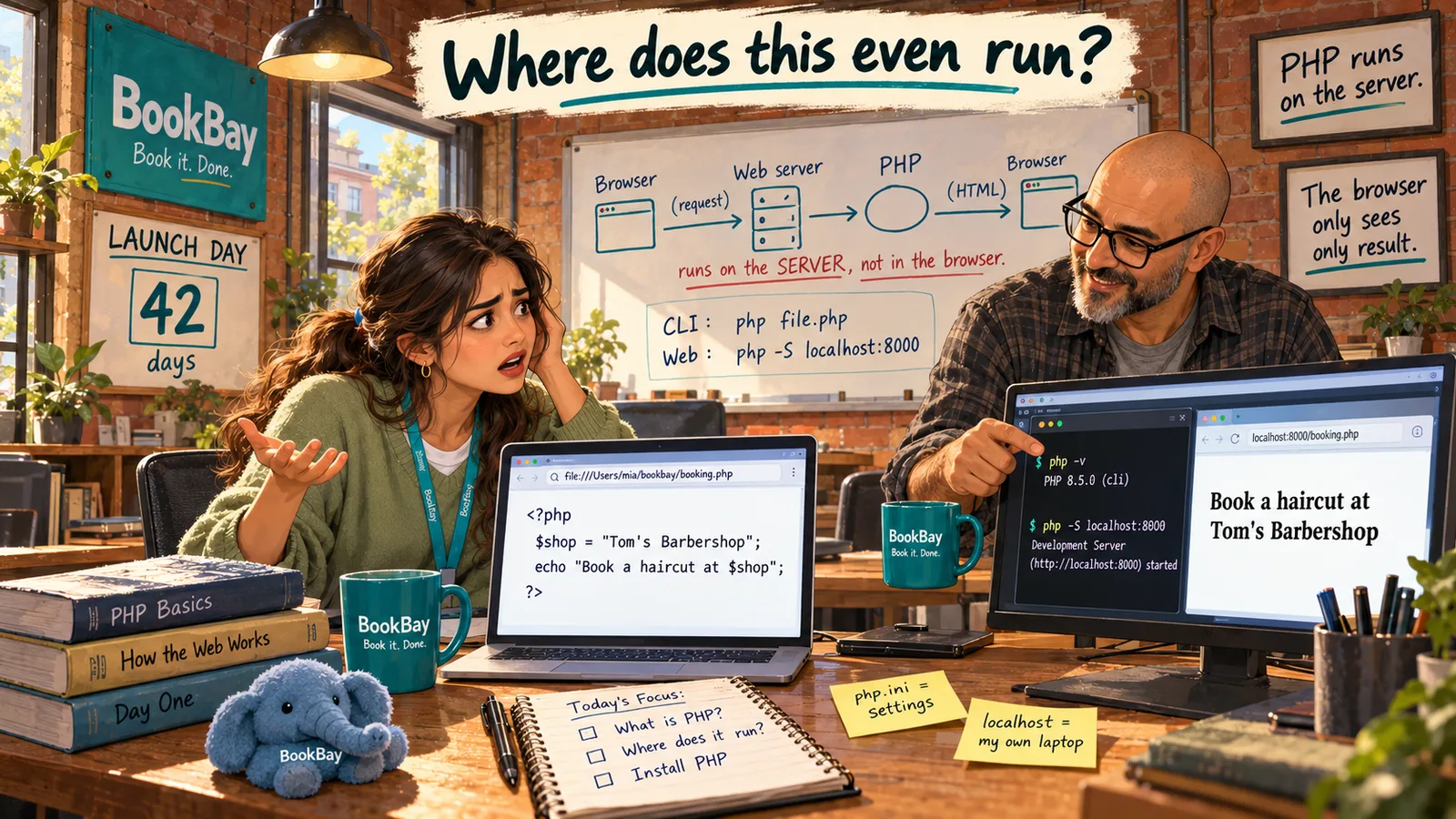
Mia double-clicks booking.php. Her browser opens — but instead of a booking page, it shows the code itself, line by line, exactly as it is written in the file. <?php, $shop = "Tom's Barbershop";, all of it.
She tries a different browser. Same thing. She looks at the address bar: file:///Users/mia/bookbay/booking.php. "Is the file broken?"
Marcus laughs kindly. "Nothing is broken. You just asked the wrong program to run it. A browser has never run PHP — not once, anywhere."
If the browser can't run PHP, then who runs it — and how does the customer ever see a page?
Mia
Opening a File vs. Visiting a Page
Opening the file
The browser just reads the file from your disk and shows its text. No PHP runs at all.
Visiting a page
The browser asks a server for the page. The server runs the PHP and sends back only the result.
A journey with stops
Between the click and the page there are several stops: browser, web server, PHP and back.
How PHP Runs a Web Request
Every website has two sides. The client is the program that asks for something — usually the customer's browser, on their phone or laptop. The server is the computer that answers. Client-side code runs on the customer's device (JavaScript in the browser is the classic example). Server-side code runs on the server — and PHP is server-side. The customer's browser never sees PHP code at all.
The client and the server talk in messages. The browser sends a request ("please give me /booking.php"), and the server sends back a response (the finished page). The rules for these messages are called HTTP — you'll learn it properly in Act 16. For now, one request in, one response out.
Here is what happens, step by step, when a customer opens Tom's booking page on a real website:
- 1. The browser sends a request: The customer types the address or taps a link. The browser sends a request to BookBay's server: "GET /booking.php".
- 2. The web server receives it: A web server is a program on the server whose job is to receive requests and send responses — the most common ones are Nginx and Apache. It looks at the address: an image or a CSS file it can send straight back by itself, but a file ending in
.phpneeds PHP. - 3. The web server hands the request to PHP: On most servers today it passes it to PHP-FPM — short for FastCGI Process Manager. (FastCGI is the agreed way a web server and PHP talk to each other.) PHP-FPM is a program that keeps a few PHP workers ready and waiting (more on this below).
- 4. PHP runs the code: The PHP interpreter reads
booking.phpfrom top to bottom and does what it says: checks today's date, looks up free slots, and writes out the HTML for the page. - 5. The result goes back: PHP gives its output — usually HTML — to the web server, and the web server sends it to the browser as the response.
- 6. The browser shows the page: The browser only knows how to show HTML, CSS and images, and that's all it received. The PHP code stayed on the server.
| Question | Client-side | Server-side |
|---|---|---|
| Where the code runs | On the customer's device, in the browser | On the company's server |
| Who can see the code | Anyone (the browser downloads it) | Only the company — visitors see only the result |
| Typical language | JavaScript | PHP (also Python, Java, Node.js…) |
| Good for | Making the page react instantly to clicks | Data, rules, passwords, payments — anything that must be trusted |
One request to Tom's booking page
Browser (client)
GET /booking.php
Web server
Nginx or Apache
PHP-FPM worker
the PHP interpreter runs booking.php
Web server
receives the HTML PHP produced
Browser
shows the page — never sees the PHP
Here is a tiny version of the file Mia opened. It mixes HTML (the page) with a PHP part between <?php and ?>.
<h1>Tom's Barbershop</h1><?php$today = "Monday";echo "<p>Free slots for $today: 9:00, 9:30, 11:00</p>";?>
PHP ran the code on the server and replaced the PHP part with what it printed. This plain HTML is all the browser ever gets.
<h1>Tom's Barbershop</h1><p>Free slots for Monday: 9:00, 9:30, 11:00</p>
No $today, no echo, no <?php — the customer can't see the code, only its result.
Look at the two code boxes above. The first is what's written in booking.php. The second is what the browser actually receives after PHP has run it. The <?php ... ?> part has disappeared, and in its place is plain text that PHP printed. That's why Mia's double-click showed raw code: opening the file directly skipped steps 2 to 5 — no web server, no PHP, just a browser reading a text file.
The interpreter and the runtime: The PHP interpreter is the program that reads PHP code and carries it out, one instruction after another. (Inside, it first turns your code into small, simple instructions called opcodes, then runs those — you'll meet them again in chapter 6 of this Act, on OPcache.) The PHP runtime is everything PHP needs while your code is running: the interpreter itself, its built-in functions, its extensions (add-on features, like talking to a database) and its settings. When someone says "install PHP on the server", they mean install this runtime.
PHP-FPM, in one paragraph: Starting PHP from zero for every single request would be slow. PHP-FPM (FastCGI Process Manager) solves this: it starts several PHP workers — ready-to-go copies of PHP — and keeps them waiting. When a request comes in, the web server hands it to a free worker, the worker runs the script (a script is a PHP file that PHP runs from top to bottom, like booking.php), and then it's ready for the next request. Think of a barbershop with several barbers already in their chairs: a customer walks in and is served at once. Chapter 7 of this Act shows how to set it up.
Every request starts fresh: When PHP finishes a request, it forgets everything that request created — every variable, every value. The next request starts with a clean slate. This makes PHP simple and safe (one customer's data can't leak into another customer's request), and it's why things that must be remembered, like bookings, are saved in a database.
PHP on the command line: PHP doesn't only run behind a web server. You can also run a PHP file directly in a terminal (a window where you type commands) with the PHP CLI — the command-line version of PHP. You type php booking.php, and the same interpreter runs the same code, but the output appears in the terminal instead of a browser. Nothing is sent over the web. Developers use the CLI for quick tests, for scripts like "send tomorrow's reminders", and for tools you'll use later in the course.
| Question | Web (through a web server) | CLI (in a terminal) |
|---|---|---|
| How it starts | A browser sends a request | You type php file.php |
| Where the output goes | Back to the browser as a web page | Printed in the terminal |
| Who starts it | Any visitor, any time | You, or a scheduled task |
| Used for | Websites, web apps, APIs | Quick tests, scripts, tools, scheduled jobs |
Same PHP interpreter, same language — only the way in and the way out are different.
Run with the CLI, the same file prints its output in the terminal — the HTML tags appear as plain text, because no browser is there to show them as a page.
$ php booking.php<h1>Tom's Barbershop</h1><p>Free slots for Monday: 9:00, 9:30, 11:00</p>
One exception you'll meet in this course: The BizTechLab PHP Playground runs a real copy of PHP inside your browser, using a technology called WebAssembly. That's a special trick for learning — it works like the CLI: run a script, see its output. Real websites never work that way. On a real website, PHP always runs on the server.
Key Takeaway
The browser never runs PHP. It sends a request; the web server passes it to PHP (usually through PHP-FPM); PHP runs the code and produces HTML; and only that result travels back. Opening a .php file directly skips the server, so you just see its code.
Why This Matters
Almost every problem you'll debug later sits at one stop of this journey. A page shows raw PHP code? The web server didn't pass the file to PHP. A "502 Bad Gateway" error? The web server couldn't reach PHP-FPM. A slow page? Maybe every PHP worker is busy. Knowing the stops tells you where to look.
It also explains a rule you'll hear again and again: never trust the browser. Anything that runs in the browser can be changed by the visitor. Prices, availability and passwords are checked by PHP on the server, where the customer can't touch the code.
"So I need a web server and PHP on my laptop," Mia says. Marcus nods. "First, PHP. But which PHP? There are lots of versions, and some of the code you'll find online is twenty years old." That's the next chapter.