

In this chapter
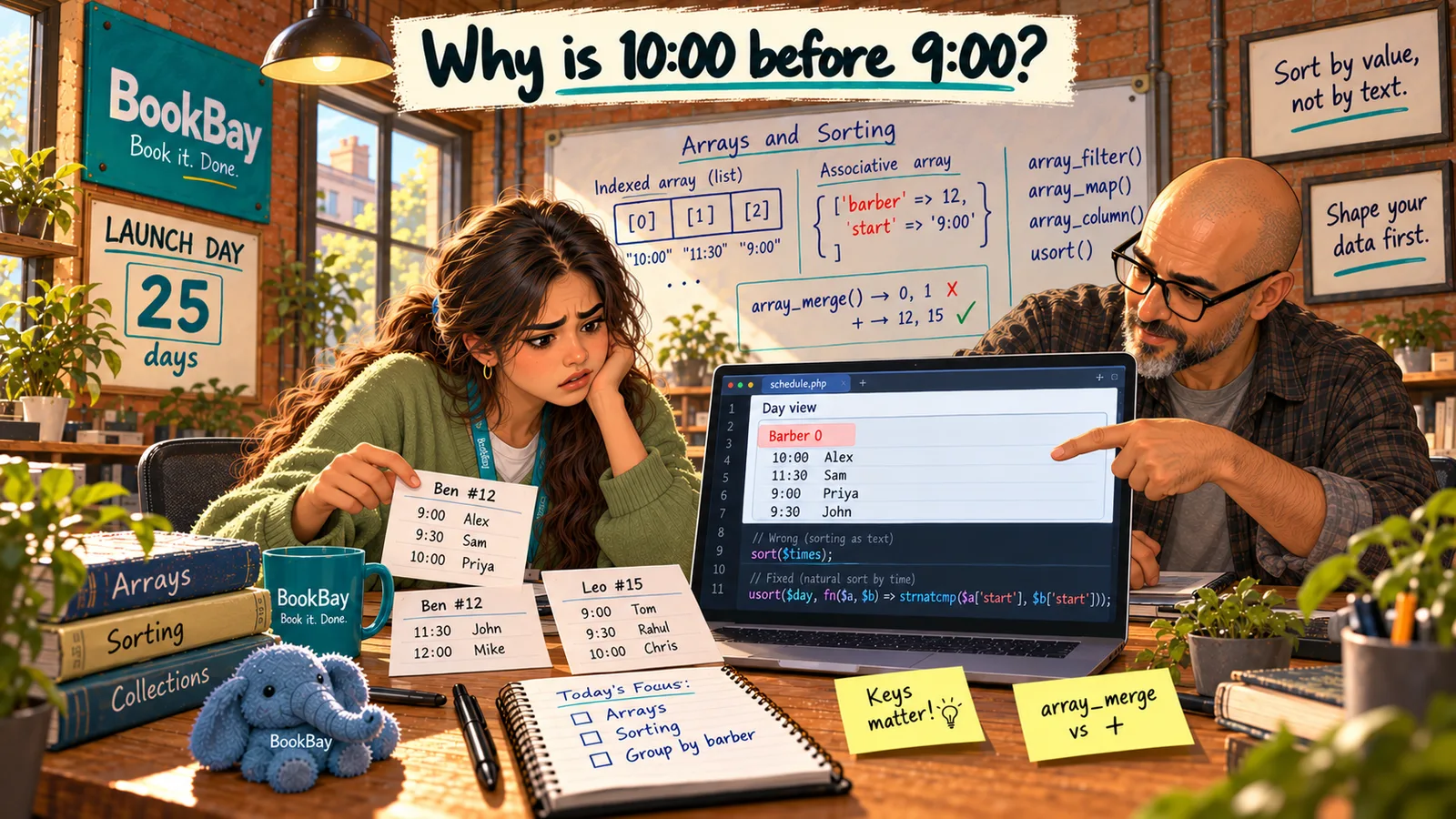
We'll learn PHP's sorting functions — sort(), rsort(), asort(), arsort(), ksort() and krsort() — how sort flags like SORT_NATURAL change the order, and how usort(), uasort() and uksort() sort by your own rule with the spaceship operator — including why "10:00" came before "9:00".
The Problem in Real Life
The first bug of the Act. Ben's bookings come out of the system in the order they were made, so Mia sorts the times before showing them: sort($times);. The day view shows 10:00, 11:30, 9:00, 9:30.
Her first fix makes it worse. She writes $times = sort($times);, and the day view prints a single "1". "sort() doesn't hand you a sorted list," says Marcus. "It sorts the list you give it, and returns true. And even then, it compared your times as text."
Ten is bigger than nine. Why does sort() put 10:00 first?
Mia
Sorting as Text vs. Sorting by Meaning
Text order is not time order
Compared as text, "1" comes before "9", so "10:00" sorts before "9:00".
Some sorts lose the keys
sort() renumbers the keys 0, 1, 2. Sorting barbers keyed by ID with it loses the IDs.
Records need a rule
A booking is an array. To sort bookings by time, PHP needs to be told which field to compare, and how.
Sorting Arrays
Sorting in PHP: PHP has many sort functions, but they differ in only three ways: what they compare (values or keys), whether they keep the keys, and which direction they sort. On top of that come flags that change how values are compared, and functions that take your own rule:
- Values, keys renumbered:
sort()andrsort()(reverse). - Values, keys kept:
asort()andarsort(). - By key:
ksort()andkrsort(). - Your own rule:
usort(),uasort()anduksort()with a comparison callback.
sort changes the array you give it: every sort function takes the array by reference (Act 03) and sorts it in place. It returns true, not a sorted copy. So sort($times); is right, and $times = sort($times); replaces your list with true — which echo prints as "1". If you need to keep the original order too, copy it first: $sorted = $times; sort($sorted);.
<?php$prices = [25, 10, 2.5];sort($prices);echo implode(" ", $prices), "\n"; // 2.5 10 25$copy = [25, 10, 2.5];$copy = sort($copy); // wrong: $copy is now truevar_dump($copy); // bool(true)
Why 10:00 came first: sort() compares values with PHP's normal rules from Act 07. "9:00" and "10:00" aren't numeric strings, because of the colon, so they're compared as text, byte by byte, and "1" comes before "9". Times are only in time order as text when they all have the same length: "09:00" sorts before "10:00". There are three fixes. Write times with leading zeros. Sort with the flag SORT_NATURAL, which compares numbers inside text as numbers, like strnatcmp(). Or, best of all, store times as minutes since midnight (integers), which sort correctly anywhere. The other flags you'll see are SORT_STRING, SORT_NUMERIC and SORT_FLAG_CASE.
<?php$times = ["10:00", "11:30", "9:00", "9:30"];sort($times);echo implode(" ", $times), "\n"; // 10:00 11:30 9:00 9:30 — as textsort($times, SORT_NATURAL);echo implode(" ", $times), "\n"; // 9:00 9:30 10:00 11:30$padded = ["10:00", "11:30", "09:00", "09:30"];sort($padded);echo implode(" ", $padded), "\n"; // 09:00 09:30 10:00 11:30$minutes = [600, 690, 540, 570]; // minutes since midnightsort($minutes);echo implode(" ", $minutes), "\n"; // 540 570 600 690
Keeping the keys: sort() and rsort() throw the keys away and number the result 0, 1, 2. For a list that's what you want. For an array whose keys mean something, like barber IDs or service names, use asort() (values, ascending) or arsort() (descending): they sort by value but keep each key with its value. ksort() and krsort() sort by key, which puts the barbers in ID order or the services in name order.
<?php$prices = ["Haircut" => 25, "Beard trim" => 10, "Hot towel" => 2.5];// json_encode() prints an array on one line, keys included (chapter 10)asort($prices);echo json_encode($prices), "\n"; // {"Hot towel":2.5,"Beard trim":10,"Haircut":25}arsort($prices);echo json_encode($prices), "\n"; // {"Haircut":25,"Beard trim":10,"Hot towel":2.5}ksort($prices);echo json_encode($prices), "\n"; // {"Beard trim":10,"Haircut":25,"Hot towel":2.5}$barbers = [15 => "Leo", 12 => "Ben"];sort($barbers);print_r($barbers); // the IDs are gone// Array// (// [0] => Ben// [1] => Leo// )
Your own rule with usort: a list of bookings can't be sorted by sort() in a useful way; you have to say which field to compare. usort($day, fn($a, $b) => $a["minutes"] <=> $b["minutes"]) does that. The callback gets two items and returns a negative number if $a should come first, 0 if they're equal and a positive number if $b should come first. The spaceship operator <=> from Act 05 returns exactly that. Swap $a and $b to sort in reverse. For times stored as "9:00" strings, compare with strnatcmp($a["time"], $b["time"]) instead. usort() renumbers the keys, uasort() keeps them, and uksort() compares keys.
<?php$day = [["time" => "10:00", "customer" => "Clare Lefèvre"],["time" => "9:30", "customer" => "Tom Hart"],["time" => "11:30", "customer" => "Sam Ortiz"],["time" => "9:00", "customer" => "Zoë Müller"],];usort($day, fn($a, $b) => strnatcmp($a["time"], $b["time"]));foreach ($day as $booking) {echo $booking["time"], " ", $booking["customer"], "\n";}// 9:00 Zoë Müller// 9:30 Tom Hart// 10:00 Clare Lefèvre// 11:30 Sam Ortizusort($day, fn($a, $b) => strnatcmp($b["time"], $a["time"])); // $b first: latest firstecho $day[0]["time"], "\n"; // 11:30
Sorting by several fields: to sort the day by barber and then by time, compare arrays with <=>: [$a["barber"], $a["minutes"]] <=> [$b["barber"], $b["minutes"]]. PHP compares the first items, and only when they're equal does it look at the second. Since PHP 8.0, sorting is also stable: items that compare as equal keep the order they had, so you can sort by time first and then by barber, too.
<?php$day = [["barber" => "Leo", "minutes" => 600, "customer" => "Sam Ortiz"],["barber" => "Ben", "minutes" => 570, "customer" => "Tom Hart"],["barber" => "Leo", "minutes" => 540, "customer" => "Zoë Müller"],["barber" => "Ben", "minutes" => 540, "customer" => "Clare Lefèvre"],];usort($day, fn($a, $b) => [$a["barber"], $a["minutes"]] <=> [$b["barber"], $b["minutes"]]);foreach ($day as $b) {printf("%s %d:%02d %s\n", $b["barber"], intdiv($b["minutes"], 60), $b["minutes"] % 60, $b["customer"]);}// Ben 9:00 Clare Lefèvre// Ben 9:30 Tom Hart// Leo 9:00 Zoë Müller// Leo 10:00 Sam Ortiz
Other orders: array_reverse($a) returns a new array in the opposite order (pass true to keep integer keys) — it doesn't sort, it just flips. natsort() and natcasesort() sort in natural order, like SORT_NATURAL, but keep the keys. shuffle() puts a list in random order, in place, and renumbers it. And when you meet array_multisort() in older code: it sorts several arrays (or columns) at once; usort() with an array comparison, as above, is easier to read. The table below lists every sort function.
| Function | Sorts by | Keys | Order |
|---|---|---|---|
| sort($a) | Value | Renumbered | Ascending |
| rsort($a) | Value | Renumbered | Descending |
| asort($a) | Value | Kept | Ascending |
| arsort($a) | Value | Kept | Descending |
| ksort($a) | Key | Kept | Ascending |
| krsort($a) | Key | Kept | Descending |
| usort($a, $fn) | Your rule | Renumbered | As $fn says |
| uasort($a, $fn) | Your rule | Kept | As $fn says |
| uksort($a, $fn) | Your rule on keys | Kept | As $fn says |
| natsort($a) / natcasesort($a) | Value, natural order | Kept | Ascending |
| shuffle($a) | Nothing: random | Renumbered | Random |
| array_reverse($a) | Nothing: flips the order | New array returned | Reversed |
<?php$times = ["9:00", "9:30", "10:00"];echo implode(" ", array_reverse($times)), "\n"; // 10:00 9:30 9:00: a new arrayecho implode(" ", $times), "\n"; // 9:00 9:30 10:00: unchanged$chairs = ["Chair 10", "Chair 2", "Chair 1"];natsort($chairs);print_r($chairs); // natural order, keys kept// Array// (// [2] => Chair 1// [1] => Chair 2// [0] => Chair 10// )$order = [1, 2, 3, 4, 5];shuffle($order); // random order, in placeecho count($order), " items, keys ", implode(",", array_keys($order)), "\n"; // 5 items, keys 0,1,2,3,4
Key Takeaway
Sort functions sort the array in place and return true — never write $a = sort($a). sort() compares "10:00" and "9:00" as text, so use SORT_NATURAL, leading zeros, or better, minutes as integers. sort()/rsort() renumber keys, asort()/arsort() keep them, ksort()/krsort() sort by key. For records, usort() (or uasort()/uksort()) with a callback that returns $a <=> $b; compare [field1, field2] arrays to sort by several fields.
Why This Matters
A schedule in the wrong order is a schedule nobody can use: Tom reads the screen top to bottom and calls the next customer. Sorting by what the values mean — time, not text — is the difference between a day view and a list of strings.
usort() with <=> is also the pattern for every custom order you'll need: customers by name, bookings by price, barbers by the number of bookings. Laravel's collections sort the same way.
Ben's day now reads 9:00, 9:30, 10:00, 11:30. Olivia has three more wishes for the screen: the next three free slots on the homepage, the evening's reminders sent in batches of 2 (the SMS service allows two per second), and the day grouped by barber. Mia takes the next three slots out of the list — and they disappear from the day. That's the next chapter.