

In this chapter
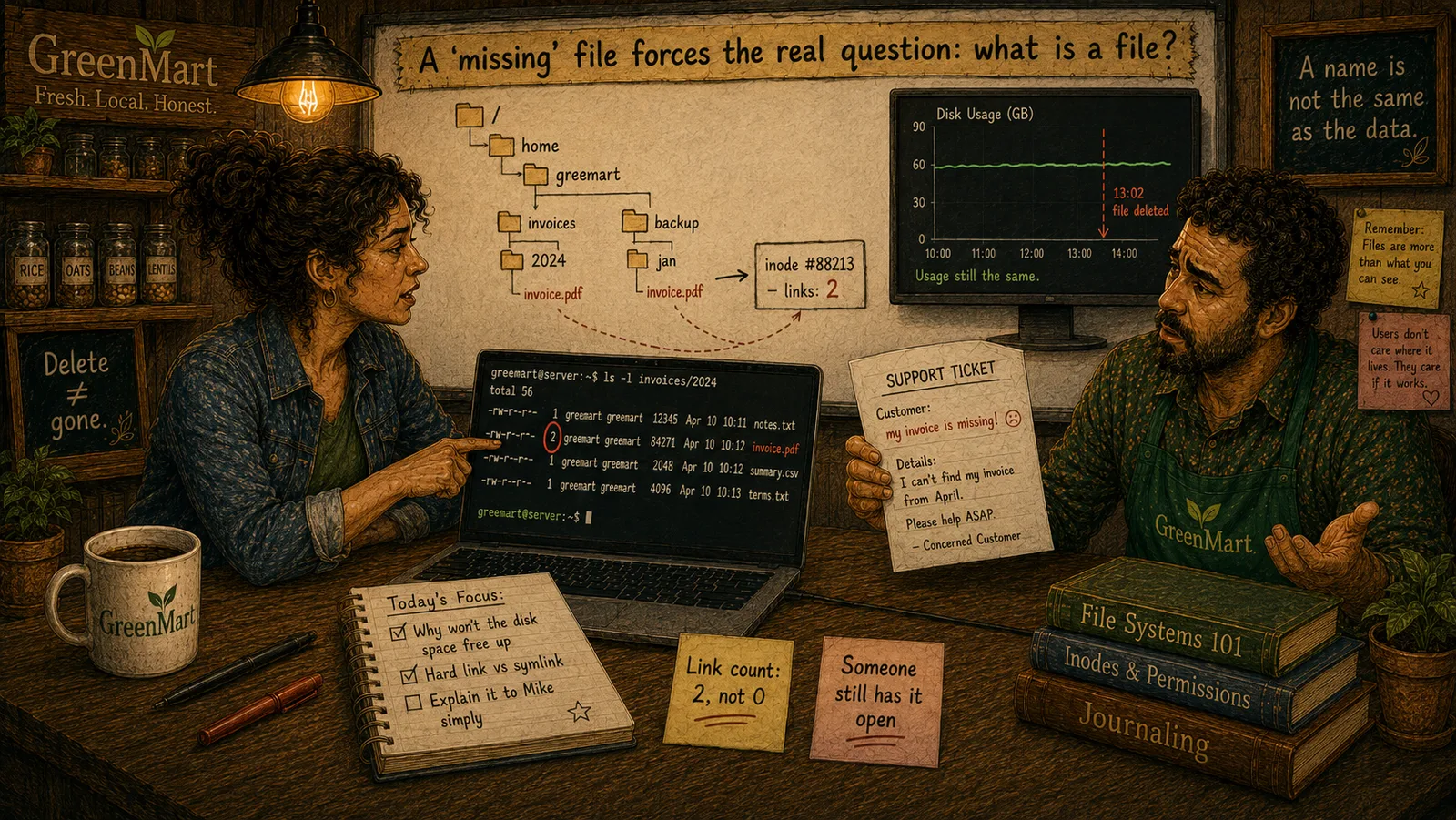
We'll widen "file" past the folder icon — a real name, real content, and real metadata, genuinely separate pieces — and set up the mystery this whole Act investigates: a file that's gone by name, but whose disk space hasn't actually been freed.
The Problem in Real Life
A support ticket lands on Sarah's desk: a customer says their downloaded invoice PDF has "vanished" from GreenMart's servers — the download link 404s. Strange part: the server's disk usage hasn't dropped by a single byte since the ticket was filed.
Mike shrugs. "Delete the file, and the space comes back. That's just how it works, right?" Sarah pauses. "Actually... I want to make sure we both agree on what a file even is, before I promise you that."
It's just a file. What else is there to agree on?
Mike
A Folder Icon vs. What's Actually There
A name and its content are genuinely separate
Renaming a file moves zero bytes of its real content — the name is just a label pointing at where the data actually lives.
"File" is an illusion built on raw blocks
Underneath every file sits numbered, unstructured block storage (Act 1) — the file system's whole job is making that feel organized and named.
What Is a File?
A file is, honestly, just a named collection of bytes, plus some real information about those bytes — where they physically live, who's allowed to touch them, when they were last changed. The folder icon on a screen is a real, useful illustration of that idea, but it's not the actual mechanism — and this whole Act exists to close that specific gap.
- A file's name and a file's data are two genuinely separate things. This sounds obvious stated plainly, but it's the single most important idea underneath everything else in this Act: the name "invoice-4471.pdf" is just a label, stored somewhere, that happens to point at where the real bytes live. Rename a file, and not one byte of its actual content moves. Delete that name — as later chapters in this Act will show precisely — and the real bytes don't necessarily disappear with it.
- "File" is an abstraction over real, physical storage. Underneath every file sits real block storage (Act 1's own vocabulary) — fixed-size chunks on a disk, addressed by number, with no inherent idea of "files" at all. A file system's entire job is building the illusion of named, organized, variable-length files on top of that raw, numbered reality — an illusion so good that most people, including Mike a moment ago, never have to think about the layer underneath it.
- Real, separate pieces make up "a file." A name (and its location in a real directory structure — next chapter's subject). Real content — the actual bytes. Real metadata — size, permissions, timestamps, and more (a later chapter's own subject, inodes). These pieces are stored, and can genuinely be manipulated, independently of each other, which is exactly why Mike's confident "delete it and the space comes back" isn't automatically, unconditionally true.
This isn't pedantry for its own sake. GreenMart's actual missing-invoice mystery — a file whose name is gone, but whose disk space hasn't budged — is only solvable once "file" stops meaning one simple thing and starts meaning these several, genuinely separate real pieces.
Key Takeaway
A file's name, its content, and its metadata are three real, separately-stored things wearing one familiar icon — and the mystery of a 'file' that's gone by name but still real on disk is exactly what happens when that separation becomes visible.
Why This Matters
Every server GreenMart runs, every upload a customer makes, every log line written — all of it ultimately becomes real files on real disks. Understanding what a file actually is, underneath the icon, is what turns a genuinely confusing support ticket into a solvable, real technical question.
GreenMart now has the real, separated pieces of a file — name, content, metadata — instead of one simple, folder-icon idea. The next chapter goes deep on the first of those pieces: how a name actually finds its file, through real directories and real paths.