

In this chapter
We'll meet the memory hierarchy — registers, cache, RAM, SSD/HDD, and network storage, layered from fastest-and-smallest to slowest-and-biggest — and see why stacking storage tiers, not picking one, is the real answer to wanting both speed and durability.
The Problem in Real Life
"Okay," Mike says, "so some things vanish on restart and some things don't. But why not just make everything persistent? Wouldn't that just... solve it?"
Sarah smiles — it's the exact question that leads to the whole reason computers are built in layers at all.
Why not just make everything persistent, all the time?
Mike
One Kind of Storage vs. a Real Hierarchy of Them
Faster always means smaller and pricier
Every step up the hierarchy trades capacity and cost for real speed — a consistent, physical trade-off, not an arbitrary one.
Every tier is used together, not instead of the others
A running program uses fast memory and slow persistent storage at the same time, automatically, each for the job it's actually suited to.
The Memory Hierarchy
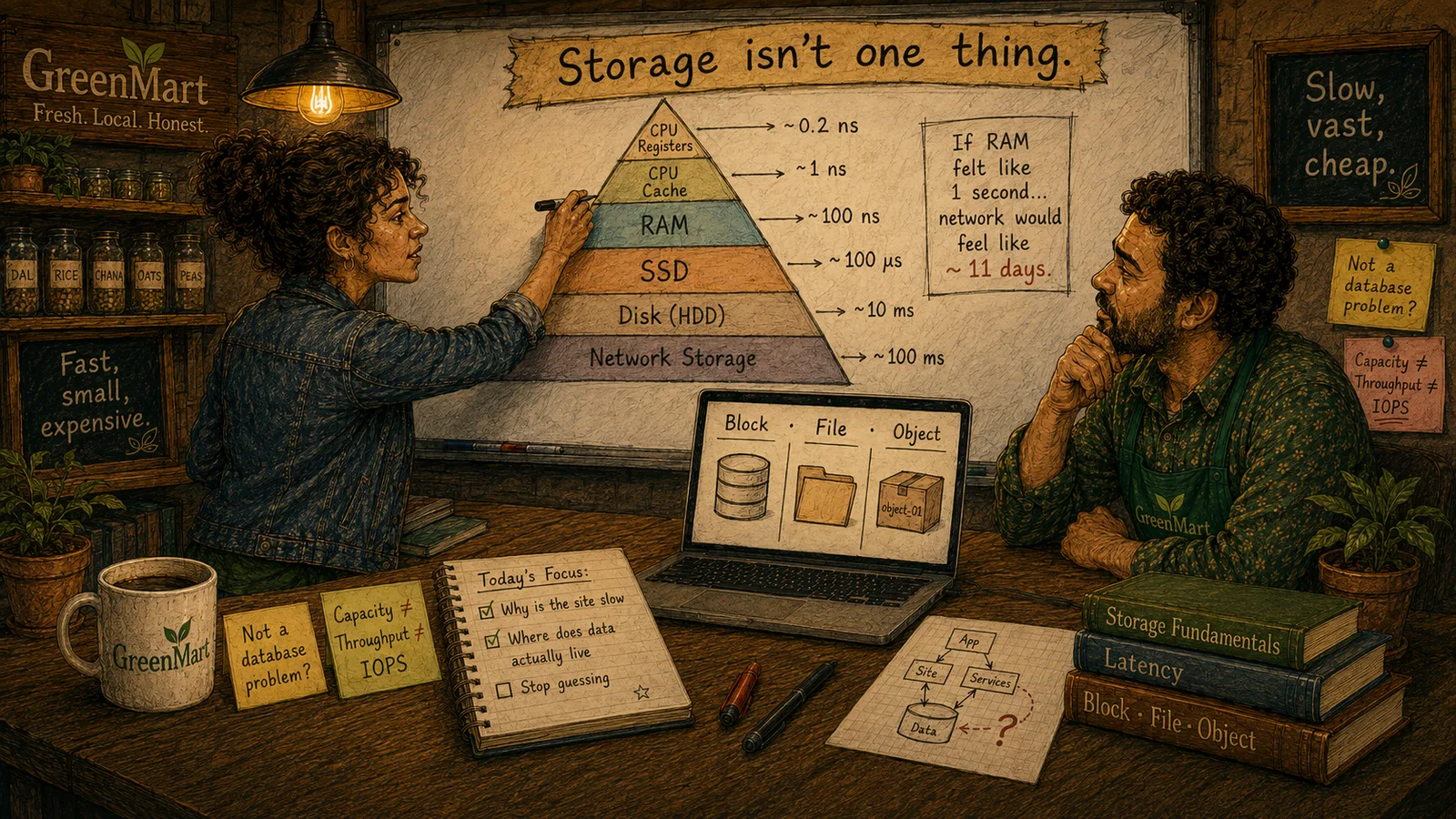
The honest answer to Mike's question is that persistent storage is real, but it's also slow and comparatively expensive per byte — and a computer that only used it would be safe and unbearably slow. The fix isn't picking one kind of storage. It's stacking several, each one trading speed for size and cost, from fastest-and-smallest at the top to slowest-and-biggest at the bottom.
- Faster always means smaller and pricier. At the very top, a CPU's own registers hold a handful of values, ready instantly. Just below, cache memory holds more, still extremely fast. RAM holds far more than either, fast enough to feel instant to a person, but nowhere near as fast as a register. Each step down the pyramid trades real speed for real capacity — and it's not a coincidence, it's physics and economics both pushing the same direction at once.
- Persistent storage sits at the bottom, on purpose. SSDs and hard disks hold vastly more than RAM, cost far less per byte, and survive a restart — exactly the trade-off Mike was asking to skip. Network storage, reached over a real network connection rather than sitting inside the machine, sits at the very bottom: the most capacity, the lowest cost per byte, and the most real latency to reach it.
- The hierarchy is used together, not instead of each other. A real running program uses every tier at once, automatically — the parts of a webpage a customer is actively looking at sit in fast memory; the full product catalog sits on disk; a backup sits on network storage. No layer replaces another; each does the job the others genuinely can't.
The Memory Hierarchy — Fastest & Smallest to Slowest & Biggest
CPU Registers
A handful of values, ready instantly — the smallest, fastest, most expensive tier
Cache Memory
More than registers, still extremely fast — sits right next to the CPU
RAM
Far more capacity than cache — volatile, gone on restart (see the previous chapter)
SSD / Hard Disk
Vastly more capacity, far cheaper per byte, real added latency to reach
Network Storage
The most capacity, the lowest cost per byte, and the most latency of all
This is the real, honest answer to "why not make everything persistent": because persistent storage alone would make every single read and write pay disk-speed cost, even for values used a thousand times a second. The hierarchy exists so the vast majority of that work happens at the fast, small, expensive top — and only the data that genuinely needs to survive pays the slower, cheaper, bottom-tier cost.
Key Takeaway
The memory hierarchy isn't a compromise nobody's happy with — it's the deliberate architecture that lets a computer be both fast for the common case and durable for the case that actually needs it, by never asking one kind of storage to do both jobs at once.
Why This Matters
Every real performance problem GreenMart will ever diagnose — a slow page, a expensive database query, a costly cloud storage bill — traces back to which tier of this hierarchy the data actually had to travel through. Understanding the shape of the hierarchy, before any specific numbers, is what makes those diagnoses possible instead of guesswork.
GreenMart now has the real shape of the trade-off underneath every storage decision: speed against size and cost, layered rather than chosen once. The next chapter puts real numbers on exactly how much speed separates each tier — numbers concrete enough to explain, precisely, why GreenMart's page feels slow.