

In this chapter
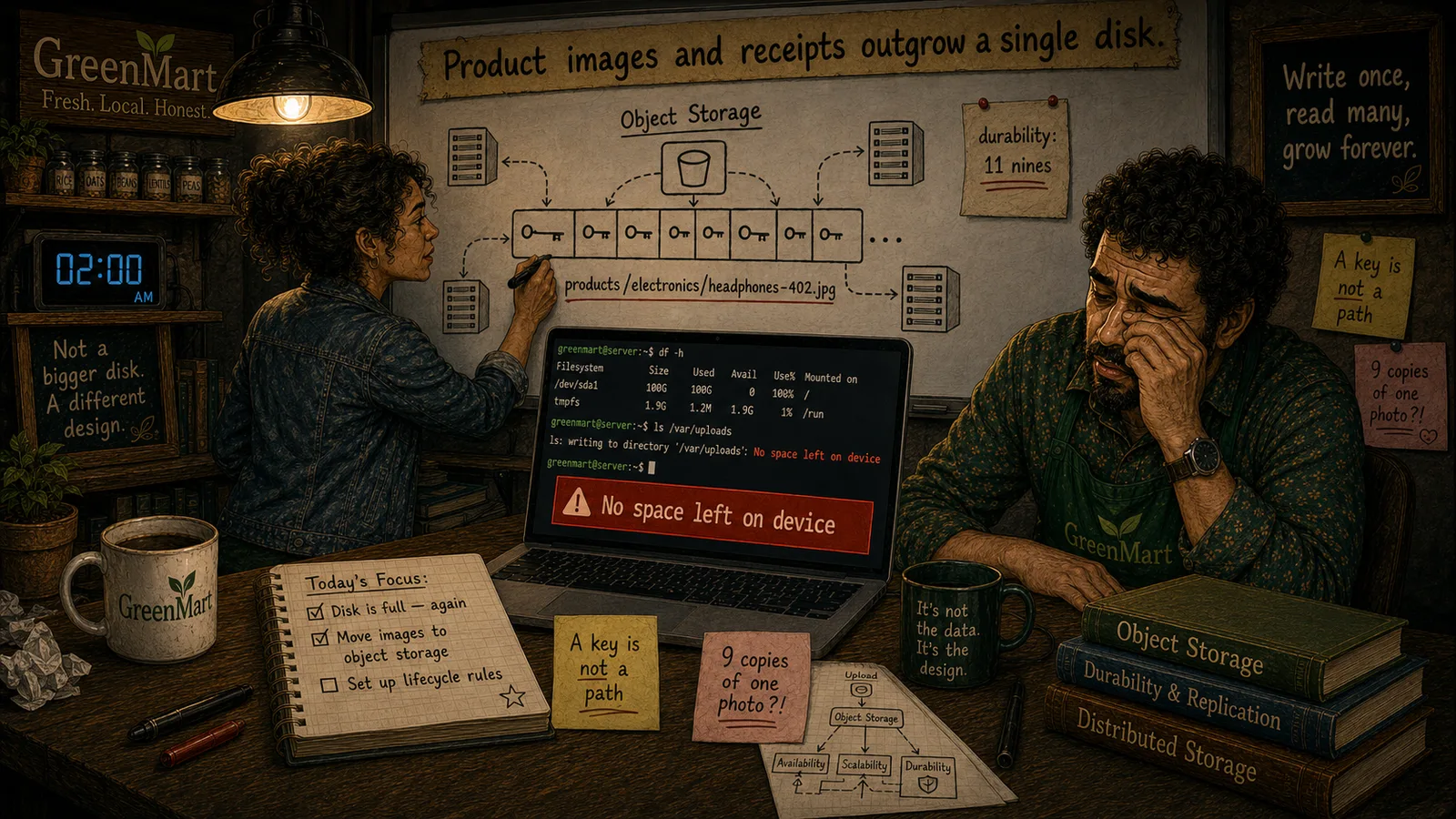
We'll meet object storage's real data model — objects (data plus metadata), buckets (flat containers), and keys (complete, flat identifiers) — and uncover the real trap in a key that looks like a folder path: underneath, it's one flat string, resolved in a single lookup, not a real nested directory structure at all.
The Problem in Real Life
Sarah starts sketching the real, actual pieces. "An object," she says, "a bucket, and a key. Three real, simple ideas — but the third one has a trap in it I want you to see before we move any product images."
Mike looks at a sample key: products/electronics/headphones-402.jpg. "That's obviously a folder path," he says.
This has slashes in it — isn't that just a folder path?
Mike
Looks Like a Path vs. Actually Just a Label
A bucket is flat — no real sub-buckets
Buckets are independent, top-level containers — not a nested folder hierarchy the way file system directories are.
A key looks like a path, but isn't one
Slashes in a key are just a naming convention — the whole string resolves in one flat lookup, with no real directory walk underneath.
Objects, Buckets & Keys
Object storage's real data model has exactly three parts: an object (the actual data, plus its real metadata), a bucket (a flat, top-level container objects live in), and a key (the real, complete identifier used to store and fetch one specific object) — genuinely simpler than a file system's own nested structure, and worth being precise about.
- An object — data plus real metadata, stored as one whole unit. An object is the real content itself (the actual bytes of a product image, a receipt PDF) bundled with real metadata describing it — content type, size, a last-modified timestamp, and often custom, real key-value tags GreenMart attaches on purpose (like
department: electronics). Unlike a file (Act 3), an object is genuinely stored and retrieved as one whole, indivisible unit — there's no real "open it and change 10 bytes" operation, matching the write-once, read-many pattern from the last chapter. - A bucket — a flat, top-level container, not a folder. A bucket is where objects actually live — but critically, a bucket is genuinely flat: it doesn't contain real sub-buckets the way a folder can contain real sub-folders. GreenMart might have one bucket for product images, another for receipts — each one a real, top-level, independent container with its own real permissions and settings, not nested inside one another.
- A key — the real, complete identifier, and the trap in it. A key is the full, real string used to store and fetch exactly one object —
products/electronics/headphones-402.jpggenuinely looks like a nested folder path, with real, honest reason: many real object storage systems let a user's own console display keys as if they were folders, purely for human convenience. But underneath, the object store itself doesn't actually walk a real chain of directories the way Act 3's own path resolution does — the entire string, slashes included, is just one flat, real key, looked up directly, in a single real step, not a multi-step directory walk. - Why this distinction genuinely matters. Because a key isn't a real path, renaming what looks like a "folder" of objects isn't the fast, metadata-only operation Act 3 showed for a real file system rename — every single object whose key starts with that prefix has to be individually copied to a new key and the old one deleted, a real, potentially expensive operation at scale. What looks like folder-organization in GreenMart's own bucket is really just a shared, real naming convention among otherwise-unrelated, independently-stored objects.
| Property | File System Path (Act 3) | Object Storage Key |
|---|---|---|
| Resolution | A real, multi-step walk through nested directories | A single, direct, flat lookup — no real directory walk |
| "Folders" | Real, nested directory structures | Just a naming convention — a shared string prefix, nothing more |
| Renaming a "folder" | Fast — a metadata-only directory rename | Slow — every object with that prefix must be copied individually |
GreenMart now has the real, precise vocabulary for what its own product-image keys actually are: not a real folder structure at all, just a flat, honest naming convention layered over a genuinely simple, single-lookup real model.
Key Takeaway
An object storage key only looks like a folder path — underneath, it's one flat, complete string, resolved in a single real lookup, with no actual nested directory structure at all, which is exactly why "renaming a folder" of objects is a real, expensive, many-object operation, not a fast metadata change.
Why This Matters
Every real product image and receipt GreenMart migrates into object storage needs a deliberately chosen key — and knowing that a key is a flat identifier, not a real path, changes how GreenMart should actually design those keys, especially anywhere a "folder" of objects might need to be renamed or reorganized later.
GreenMart now has the real, complete data model — objects, buckets, keys — and the honest truth that a key only looks like a path. The next chapter puts object storage and file storage directly side by side, closing the real comparison Act 3 and this Act have both been building toward.